Snow & Ice Removal
Run your Snow & Ice Removal field work. Every job verified.
Operators get a text for every property in a storm and confirm with a live photo once the lot is cleared. Each Storm Event Log is filed tamper-evident and dispute-ready. No app download. No hardware. Just a link.
Last updated November 20, 2026
14 days. No card needed.
Today 4:35 AM
Hi Tomasz Wilk, please verify your service at Halverson Medical Plaza. Submit a live photo: https://lockproof.com/s/
- Property
- Halverson Medical Plaza
- Operator
- Tomasz Wilk
- Server-set time
- Jan 14, 4:37 AM
- Location
- Shared by the worker
- Fingerprint (SHA-256)
- 9f2c41ab…e8d81a
Illustration. The people and places are invented.
How it works
How it works for Snow & Ice Removal
1.
Add your properties
Enter each property you want to monitor.
2.
Assign operators
Add each operator with their phone or email. Set reminder schedule.
3.
Automatic reminders
LockProof texts or emails your operators on schedule. No action needed.
4.
Photo proof collected
Operators submit a live photo, GPS-tagged when they share location. It's kept on file with the record.
A film in four chapters
Watch the three-minute film
The operator, the office, the client, then the claim that comes weeks later. Use the chapter buttons to jump to one person. The same screens are laid out below to read at your own pace.
This film is an illustration. The people, buildings and companies in it are invented. The wording on each app screen is the app’s own. The labels around the screens and the picture of the server are the film’s.
Read the transcript
Opening 0:00
In March, a letter says someone slipped on the front walk in February. The contractor says the walk was cleared and salted before six that morning. Here is one storm, as each person sees it.
The operator 0:13
First, the operator. During a storm, his phone is a plow-cab tool: a text, a camera, a done screen. The office sends the check now. With snow still coming down, the office taps Send Reminder, and the text goes out right then. Before: the walk as he finds it. Check-in is a photo through the live camera. The gallery is blocked. After: the same walk, cleared and salted. A check-out photo and an optional note close the visit. Both photos are sealed on arrival. Our server sets the time, and a SHA-256 fingerprint covers the record, so a later edit would no longer match it. The location comes from his phone when he shares it, and you can require it before a worker can submit. The time between his two photos is recorded. It is the stretch between his two server-set times.
The office 1:09
Next, the office. Corinne runs the night from the shop. Sixty-four properties, eleven operators, one screen. The storm, on one screen. Today’s rate sets compliant checks against every check that went out, misses counted and excused ones dropped. One silent check, one email. An operator who doesn’t send a photo in time sets off an email to the manager on record.
The client 1:36
Now, the client. Nadia checks on the contractor from her own desk, without an account. The client sees its properties and no one else’s. Her portal link opens with no login, and lists only the two Halverson properties, for the last 30 days.
The claim 1:54
Last, the claim, weeks later. In March a letter arrives. Someone slipped on the plaza’s front walk on February 14. The letter names a day; the log goes straight to it. Filter to the plaza and to February 14, and that day’s two visits are the only rows left. Before and after, with times our server set. The snowed-in walk at check-in, and the cleared, salted walk at check-out, each with its server-set time, plus the location he shared and his note. The insurer gets a record, not a promise. Corinne sends the insurer a seven-day proof link. It shows both photos, each with the time our server set when it arrived, and the time between them. A record shows when photos were submitted and what they show, never that the walk was safe. LockProof. Know the work got done, without calling anyone. See it for your own crew at lockproof.com.
Four walks through one storm
Follow one storm from first flake to the claim
One February storm and one medical plaza: what the plow operator taps at dawn, what the office watches, what the client sees, and what the office pulls out when a claim letter shows up weeks later.
Treat every screen here as an illustration. The snow contractor, operators, clients and properties are invented, and the screen wording is taken from the app. A few of them, such as the Route Map and Visit Mode, depend on features an account switches on.
The operator
Tomasz Wilk plows for Northdrift Snow & Ice. During a storm his phone is a plow-cab tool: a text, a camera, a done screen.
Sat 4:41 AM
Hi Tomasz Wilk, please verify your service at Halverson Medical Plaza. Submit a live photo: https://lockproof.com/s/K0VT1RM8ZD
LockProof
Check in at Halverson Medical Plaza
Take a live photo to check in and start your visit.
LockProof
Check out from Halverson Medical Plaza
Take a live photo to check out and complete your visit.
Visit note, optional
Walk and ramp cleared. Salted twice.
Do not include medical or personal health details
Visit complete
4:58 AM → 5:36 AM
38m
You can close this window
The office
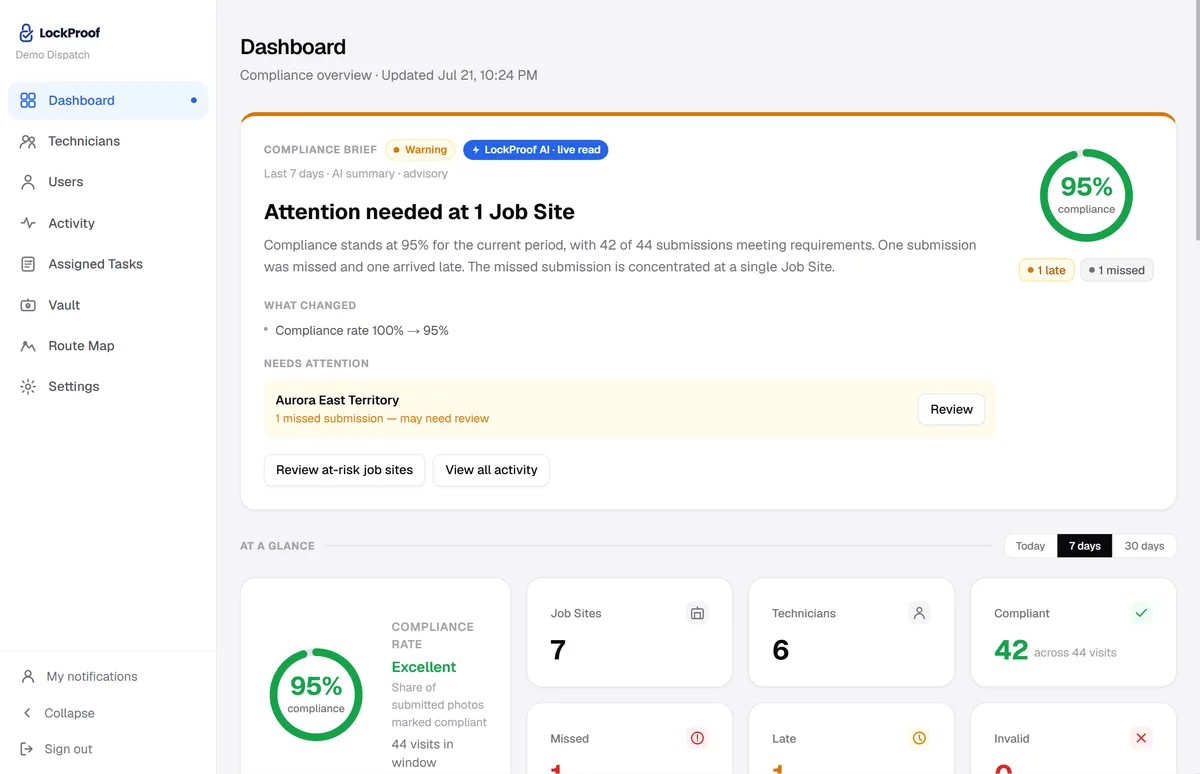
Corinne Abara runs the night from the shop. Sixty-four properties, eleven operators, one screen.
Dashboard
Compliance overview
Compliance Brief
Warning
Today · AI summary · advisory
Attention needed at 2 Properties
Compliant out of every check sent, once due. Misses count; excused don’t.
Route Map
View verified stops over a selected time range.
Stop #3
5:47 AM · Birchgate Library · Duration: 29m
Stops are shown in chronological order. The connecting line links stops in sequence and is not a record of the path traveled.
From LockProof
Subject Non-compliance alert — Marrow Creek Offices
Non-Compliance Alert
Missed Service Verification
NO RESPONSE — MISSED
The client
Nadia Feld manages facilities for Halverson Medical Group. She checks on the contractor from her own desk, without an account.
Halverson Medical Group
Sites
The claim, weeks later
In March a letter arrives: someone slipped on the plaza’s front walk on February 14 and is claiming damages.
Activity Log
Search Property, Operator, or Manager…
Record detail
Check-in
Check-out
Verification Proof
Check-in
Check-out
Check-in
Check-out
Check-in: Verified on time
Verified by LockProof · This link expires 7 days from generation
What you get
What a finished storm event files as
This is what one storm event becomes — a live photo with a server-set time and a SHA-256 chain of custody, plus GPS when the operator shares location, ready to send a client who asks.
- Property
- Halverson Medical Plaza
- Operator
- Tomasz Wilk
- Server-set time
- Jan 14, 4:37 AM
- Location
- Shared by the worker
- Fingerprint (SHA-256)
- 9f2c41ab…e8d81a
Your properties on one screen
Your operators submit from the field, and this is where it lands: verified, late, and missed work at a glance, searchable by property and date.
Why LockProof
Why Snow & Ice Removal teams use LockProof
- Operators tap a text and shoot a live photo of the cleared lot, gallery blocked
- A server timestamp seals on submission (GPS when shared), so the record can’t be back-dated
- SHA-256 fingerprints every record, so a later change to the storm log is detectable
Client Portal
Give clients a live proof portal
Stop sending PDFs. With the client portal on, give each client a portal link, no account needed, that shows their properties and the share of checks verified at each over the last 30 days.
- Per-client portal
- Share of checks verified, per property, last 30 days
- Each client sees only what’s theirs
- No client account needed
Evidence Vault
When a client asks
And if a client ever asks, the record is already there. Search by property and date, pull the photo, the timestamp, and GPS when it was shared, and share a tamper-evident link.
- Dispute search
- Shareable proof links
- Audit record kept on file
- Tamper-evident format
A dispute, hypothetically
“The lot wasn’t cleared before the 6 AM open”
Picture a retail landlord who says your crew never cleared the lot before the store opened at 6 AM, and withholds the invoice. Your operator’s record shows a photo of the cleared lot, submitted at 5:20 AM, with the location the operator shared. The timestamp settles the invoice on its own. This is illustrative, not a real account, but a storm is exactly when disputes pile up: every site was hit once, the calls come in at dawn, and the crew can’t be everywhere to argue. A live photo taken once a lot is done, with a sealed time and the place when the operator shares it, is the difference between getting paid and eating a no-pay claim after a long night out plowing.
FAQ
Snow and ice removal questions
How do I prove a lot was cleared, and when?
Each site sends the operator a link. They take a live photo of the cleared lot, and a server timestamp attaches on submission, with GPS when the worker shares location. The record lands on your dashboard filed under the site and sealed, so “you cleared it late” meets a sealed time instead of a memory.
A client withheld payment claiming we were late. What settles it?
Pull the site’s record for that storm and share a tamper-evident link: the photo of the cleared lot, its sealed time, and GPS when it was shared. A timestamp the operator cannot set is what turns a withheld invoice into a short conversation.
Do operators need an app in the middle of a storm?
No. The operator taps a text link and the camera opens, gloves and all. Nothing to install, nothing to log into, and it works in English and Spanish. One live photo per site, no app to fight with at 4 AM.
Can a photo be faked or reused across sites?
Reusing an old shot is blocked: the link opens the live camera only, with gallery uploads off, so a worker can’t attach a picture from the roll. Each capture carries a server-set time and a SHA-256 fingerprint, plus GPS when the worker shares location. If site proximity is on, a reading beyond a set distance from the site is flagged on your dashboard, so a shot from one lot stands out from another. Any later change to the record is detectable.
Can I show every site across a route in one place?
Yes. One dashboard shows verified, late, and missed work at a glance, and with the client portal on, each client can get a live portal for their own sites. After a storm you review by exception: look at what is late or missing, and let the proven sites sit.
Ready to get started?
Build your slip-and-fall defense automatically, every storm.
14 days. No card needed.
No obligation. We'll walk you through it live.