Home Care Agencies
Run your Home Care Agencies field work. Every job verified.
Every visit your caregivers make is confirmed with a live photo as it is submitted, so your office and the family both know, without a phone call. No app download. No hardware. Just a link.
Last updated November 11, 2026
14 days. No card needed.
Today 9:00 AM
Hi Ama Owusu, please verify your visit at The Herrera home. Submit a live photo: https://lockproof.com/s/
- Client Home
- The Herrera home
- Caregiver
- Ama Owusu
- Server-set time
- Jun 10, 9:02 AM
- Location
- Shared by the worker
- Fingerprint (SHA-256)
- 9f2c41ab…e8d81a
Illustration. The people and places are invented.
How it works
How it works for Home Care Agencies
1.
Add your client homes
Enter each client home you want to monitor.
2.
Assign caregivers
Add each caregiver with their phone or email. Set reminder schedule.
3.
Automatic reminders
LockProof texts or emails your caregivers on schedule. No action needed.
4.
Photo proof collected
Caregivers submit a live photo, GPS-tagged when they share location. It's kept on file with the record.
What you get
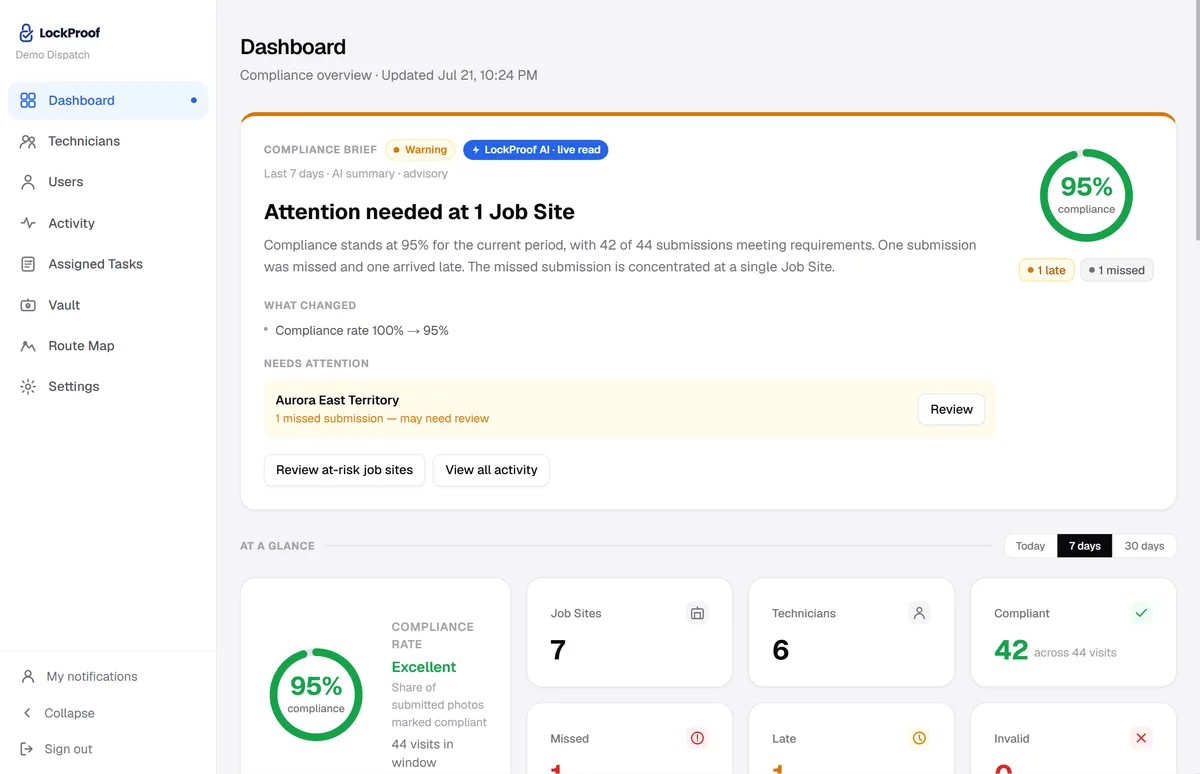
Your client homes on one screen
Your caregivers submit from the field, and this is where it lands: verified, late, and missed work at a glance, searchable by client home and date.
Why LockProof
Why Home Care Agencies teams use LockProof
- Check-in and check-out with a server time (GPS when shared) and verified duration, filed tamper-evident
- A live Family Portal that shows loved ones their recent visits
- Coordinators get an email when a check passes its window with no photo, because a no-show is a safety event
LockProof complements your certified EVV system and your clinical documentation. It is the tamper-evident presence layer, with privacy-first guidance to photograph task sheets or doorways, never patients.
Client Portal
Give clients a live proof portal
Stop sending PDFs. With the client portal on, give each client a portal link, no account needed, that shows their client homes and the share of checks verified at each over the last 30 days.
- Per-client portal
- Share of checks verified, per client home, last 30 days
- Each client sees only what’s theirs
- No client account needed
Evidence Vault
When a client asks
And if a client ever asks, the record is already there. Search by client home and date, pull the photo, the timestamp, and GPS when it was shared, and share a tamper-evident link.
- Dispute search
- Shareable proof links
- Audit record kept on file
- Tamper-evident format
A question, hypothetically
“Did the aide actually come Tuesday?”
Picture a home care agency whose client’s daughter calls, unsure the aide visited on Tuesday. With visit mode, the aide sent a check-in photo and a check-out photo. The record shows both, each with its sealed time, and the time between them, filed under the address, and the daughter gets a signed link and stops worrying. This is illustrative, not a real client. The photo is of the task or the doorway, never the client — LockProof is a presence layer, not a clinical record, and it sits alongside your certified EVV system. It is a record of each visit as photographed, in a form the office and a family can both see, without a phone call.
FAQ
Home care questions
How do I prove a caregiver visit happened?
Visit mode captures a check-in photo and a check-out photo, each filed under the address with a server-set time, and the time between them. The visit lands on your dashboard as a record the office can see, and a family member can be sent a signed link.
How is this different from an EVV clock-in?
An EVV clock-in proves a phone was near the address at a time. LockProof adds a live photo of the visit itself, with a sealed time — and a location when the caregiver shares it — so you can show what happened, not only that someone checked in. It sits alongside your certified EVV, as the presence layer.
What gets photographed — is the client in the photo?
No. The guidance is privacy-first: photograph a task sheet, a completed task, or the doorway, never the client. LockProof is a tamper-evident presence layer, not a clinical or medical record, so the photo records the visit without capturing the person receiving care.
Do caregivers need an app or a login?
No. The caregiver taps a text link and the camera opens. Nothing to install, nothing to remember, and it works in English and Spanish. The link opens a live camera only, so the photo is taken live, not uploaded from a gallery afterward.
Can a family see that the visit happened?
Yes. Each visit can be shared as one signed link, open for seven days. A family member opens it in a browser, with no account, and sees the check-in and check-out photos, each with its sealed time, the time between them, and the place on any photo where the caregiver shared it; while a visit is still open, it shows the check-in and says the check-out is not in yet. If a family or a payer ever disputes a visit, the record is already on file, dispute-ready.
Ready to get started?
Win private-pay contracts with proof no other agency can offer.
14 days. No card needed.
No obligation. We'll walk you through it live.