Field Service
Run your Field Service field work. Every job verified.
Every work order your technicians run starts with a text and a live photo when it's done. The verified, tamper-evident record is waiting in your dashboard. No app download. No hardware. Just a link.
Verified record
Technician · Job Site
Live photo
Captured by technicianScheduled link
Gallery blocked
Attached automatically; GPS when shared
Tamper-evident
How it works
How it works for Field Service
Add your job sites
Enter each job site you want to monitor. Takes 60 seconds.
Assign technicians
Add each technician with their phone or email. Set reminder schedule.
Automatic reminders
LockProof texts or emails your technicians on schedule. No action needed.
Photo proof collected
Technicians submit a live photo, GPS-tagged when they share location. It's stored forever.
What you get
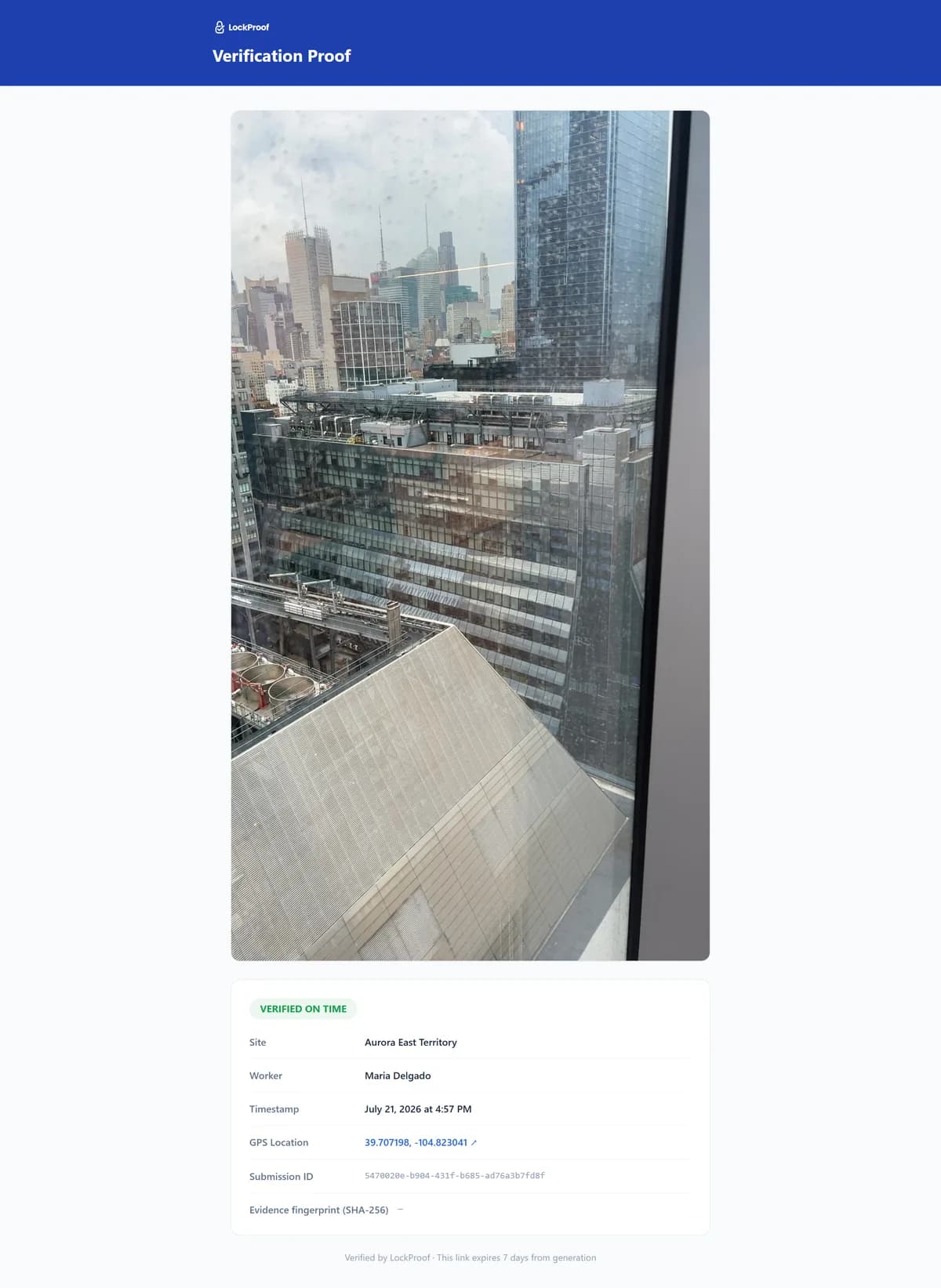
What a finished work order files as
This is what one work order becomes — a live photo with a server-set time and a SHA-256 chain of custody, plus GPS when the technician shares location, ready to send a customer who asks.
Why LockProof
Why Field Service teams use LockProof
Morning Briefing
Stop checking, start knowing
Every morning, LockProof emails you a compliance briefing covering every job site, so you walk into the day already knowing what happened overnight.
☀️ Morning Briefing · 7:00 AM
Client Portal
Give clients a live proof portal
Stop sending PDFs. Give each client a live, branded portal showing real-time compliance across their job sites, with one-click proof downloads for any date.
Evidence Vault
When a client asks
And if a client ever asks, the record is already there. Search by job site and date, pull the photo, the timestamp, and GPS when it was shared, and share a tamper-evident link in seconds.
A dispute, hypothetically
“You never cleaned that coil”
Picture an HVAC company billed for a coil cleaning the customer now disputes. The technician had captured the coil before and after through the link, both stamped with time and location. The before-and-after pair answers the dispute on its own — the work is on the record, not in an argument. This is illustrative, not a customer story, but it is the ordinary shape of a completed-work dispute: the invoice says done, the customer says prove it, and a technician’s sign-off carries no weight because the technician is the one being questioned. A live photo of the finished job, tied to the site and the clock, moves the answer off the technician’s word and onto the work itself.
FAQ
Field service questions
How do I prove a work order was actually completed?
Assign the job and the technician gets a text link. They photograph the finished work through the live camera, and a server timestamp attaches on submission, with GPS when the worker shares location. The work order lands on your dashboard as a sealed record you can pull up by site, technician, or date.
How is this different from a sign-off in my CMMS?
A sign-off is a self-attestation: the technician marks the job done. LockProof captures evidence instead — a live photo with a server-set time, and GPS when the worker shares location, fingerprinted so it can’t be quietly changed. It sits alongside your CMMS as the proof the sign-off is missing, not a replacement for it.
Do technicians need an app or a login?
No. The technician taps a text link and the camera opens. Nothing to install, nothing to remember, and it works in English and Spanish. The link opens a live camera only, so the photo is taken on the job, not uploaded from a gallery later.
Can I capture before-and-after on one job?
Yes. Each capture is its own live photo with its own sealed time, plus GPS when the worker shares location, so a before and an after both hold up on their own. For a disputed repair, that pair shows the state you found and the state you left, tied to the site and the clock.
A customer disputes a job months later. What do I send?
Search the Evidence Vault by that job and share a tamper-evident link with the photo, the sealed time, and GPS when it was shared. Because every finished job was filed when it happened, a dispute that lands months later meets a record that is already there, dispute-ready.
Ready to get started?
Prove your field team completed the job — automatically.
No obligation. We'll walk you through it live.