Work order verification software
Verify every work order with a live photo
What is work order verification software?
Work order verification software confirms that an assigned job was actually completed, with a record you can check later. Instead of trusting a checkbox, it captures proof at the work itself: a live photo and the time, plus the location when the tech shares it. LockProof does this for each job, sealed so the record holds up when a client or an auditor asks.
How is LockProof different from a CMMS work-order sign-off?
A CMMS sign-off is a self-attestation: the tech or a supervisor marks the job done, sometimes with an e-signature. LockProof captures evidence instead — a live photo with a server-set time and GPS when the worker shares location, sealed with a hash so the record can't be quietly changed. One says the work happened; the other shows it. A sign-off is only ever as honest as the person entering it, and a checkbox carries no evidence of the work behind it. A live photo with a sealed time does.
Does LockProof replace my CMMS?
No. Keep your CMMS for scheduling, assets, and parts. LockProof adds the one thing a work-order sign-off cannot: proof the job was actually done, captured at the work with a live photo and a sealed time, plus GPS when the tech shares location. It is not a full CMMS. It is the verification layer that sits on top of one.
Do techs need an app or a login?
No. The tech taps a text link and the camera opens. Nothing on the phone to install, nothing to remember, and it works in English and Spanish. The link opens a live camera only, so the photo is taken on site, not picked from the camera roll afterward.
How much does work order verification software cost?
LockProof pricing is per site and confirmed on a short call. Essentials starts at $99 a month and Professional at $399 a month. Your exact plan depends on team size and how many sites you run. Book a demo and we will price it against your own sites.
Can a tech fake the photo or its timestamp?
The link opens a live camera only, so an old shot can't be attached from the camera roll, and reminder timing is randomized so a job can't be staged before the tech is on site. Every submission carries a server-set time the tech cannot change and a SHA-256 hash, so any later edit to the record is detectable.
How it works
Four steps, and no app on the tech’s phone.
- Assign the work order. Schedule it in LockProof and the tech gets a text with a link.
- The link opens the camera. It’s a live camera only, so the shot is taken on site, not picked from the camera roll.
- The record is sealed. The photo is filed with a server-set time, and GPS when the tech shares location, hashed with SHA-256 so any later edit to it shows.
- Send the proof. Every finished job lands on your dashboard, searchable, and goes out as one signed link when a client, a GC, or an auditor asks.
What each verified work order carries
- A live photo of the finished job, captured through the link, not pulled from the camera roll
- GPS recorded on submission when the tech shares location, flagged if it lands beyond a set distance from the site
- A server-set timestamp the tech cannot edit
- A SHA-256 hash sealing every work-order record
- A dashboard that marks each work order done, late, or missed
- An Evidence Vault you can search by site, tech, or date
- A signed proof link to send a client or a GC, good for 7 days
- No app on the tech’s phone, and no login, in English and Spanish
What a closed work order files as
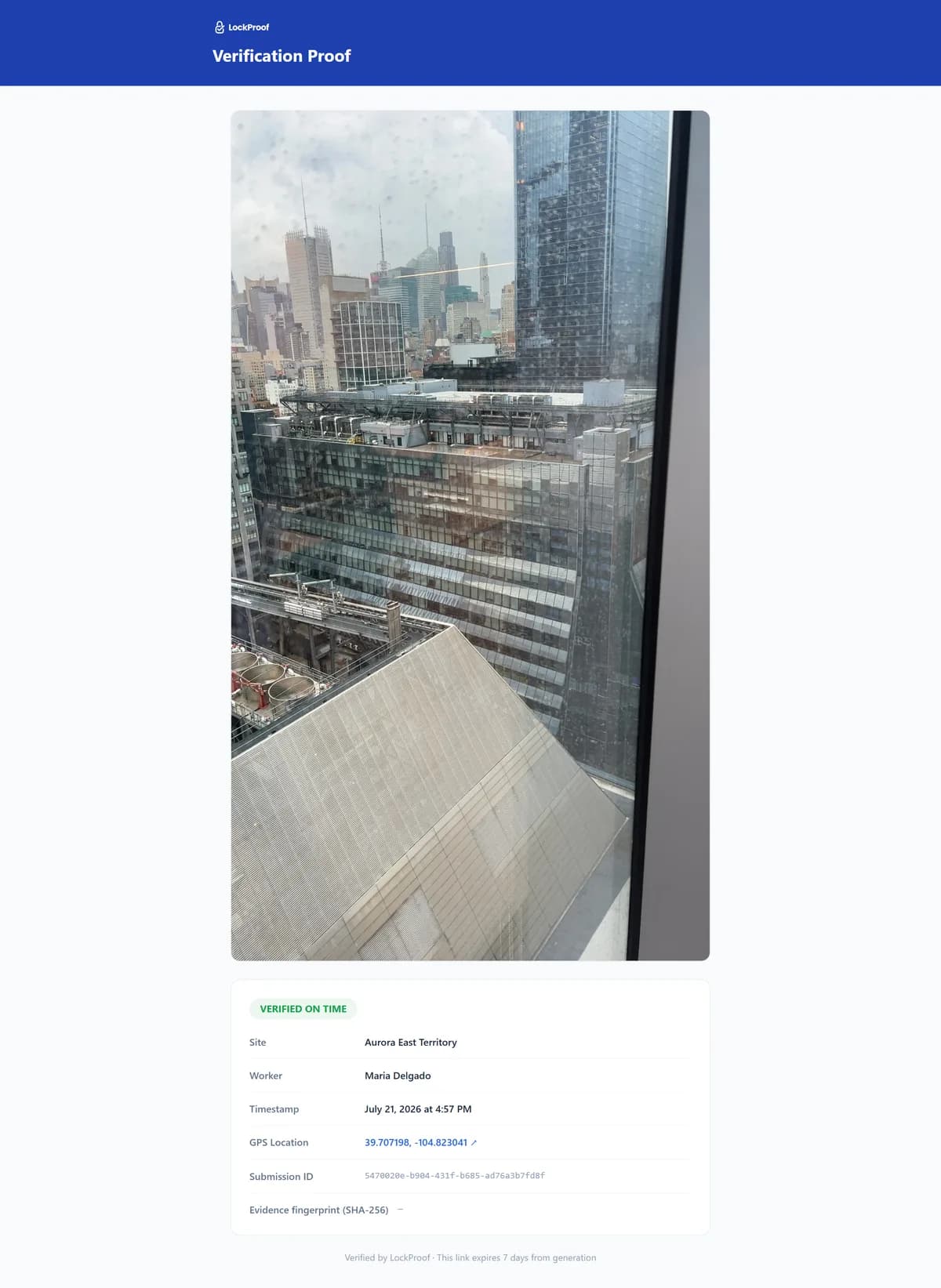
This is what the verification layer produces on top of your CMMS: the finished work order as a live photo, carrying a server-set time and a SHA-256 chain of custody, plus GPS when the technician shares location. One link covers the close when someone questions it.
Why a work-order record matters now
Padded work orders get billed as done, and the money is real. A construction estimating and consulting firm, VJ Associates, pleaded guilty to conspiracy to commit wire fraud for padding its time charges on government-funded construction projects in Massachusetts and New York over roughly a decade (2007–2018), billing for unrelated work, for administrative time, and for hours when no work was done at all. The firm was ordered to pay about $1.3 million in restitution plus a $530,000 fine, and was permanently debarred (U.S. Attorney’s Office, District of Massachusetts). The pattern is the one every facilities manager and GC watches for: a job gets billed as complete when the hours, or the work, weren’t there. Checking that invoice takes an independent record that the job was actually done, tied to a place and a sealed time. A live photo, filed against the work order, is that record — on file before anyone questions the bill, dispute-ready.
Sign-off vs. proof
Your CMMS marks a work order done with a sign-off: a checkbox or an e-signature. That is fine until someone asks you to show it. LockProof adds the proof next to it. Here is what each kind of record actually carries.
| What the record carries | LockProof | A typed sign-off / e-signature | A photo texted to the office |
|---|---|---|---|
| Proof the work was done | Live photo per job | A checkbox or signature | Maybe a photo |
| Tied to the exact place | GPS when shared | No | Rarely |
| Time you can trust | Server-set | Typed or device time | Editable |
| A later change is detectable | SHA-256 chain of custody | No | No |
| Filed and searchable | Evidence Vault | In the CMMS record | No |
| Ready to share when asked | One signed link | The sign-off only | No |
Works alongside your CMMS
LockProof is the verification layer, not a replacement for your maintenance system. Keep the CMMS that runs your work orders, assets, and parts, and let LockProof add the live-photo proof a sign-off can’t. It layers on top of the CMMS platforms teams already run.
| Your CMMS | How LockProof fits |
|---|---|
| UpKeep | Layers on top with live-photo proof of each job |
| Fiix | Layers on top with live-photo proof of each job |
| eMaint | Layers on top with live-photo proof of each job |
| OxMaint | Layers on top with live-photo proof of each job |
See a finished example in a sample verified record, or see how it fits property management teams. LockProof sits alongside your CMMS. It is the proof each work order was done, ready the day a client or an auditor asks. See how it stacks up against a CMMS in LockProof vs. OxMaint.