Mobile Workforce & Delivery
Run your Mobile Workforce & Delivery field work. Every job verified.
Every stop on the route works the same way: field workers get a text, check in with a live photo instead of constant tracking, and each stop comes back as a verified, tamper-evident record. No app download. No hardware. Just a link.
Verified record
Field Worker · Route
Live photo
Captured by field workerScheduled link
Gallery blocked
Attached automatically; GPS when shared
Tamper-evident
How it works
How it works for Mobile Workforce & Delivery
Add your routes
Enter each route you want to monitor. Takes 60 seconds.
Assign field workers
Add each field worker with their phone or email. Set reminder schedule.
Automatic reminders
LockProof texts or emails your field workers on schedule. No action needed.
Photo proof collected
Field Workers submit a live photo, GPS-tagged when they share location. It's stored forever.
What you get
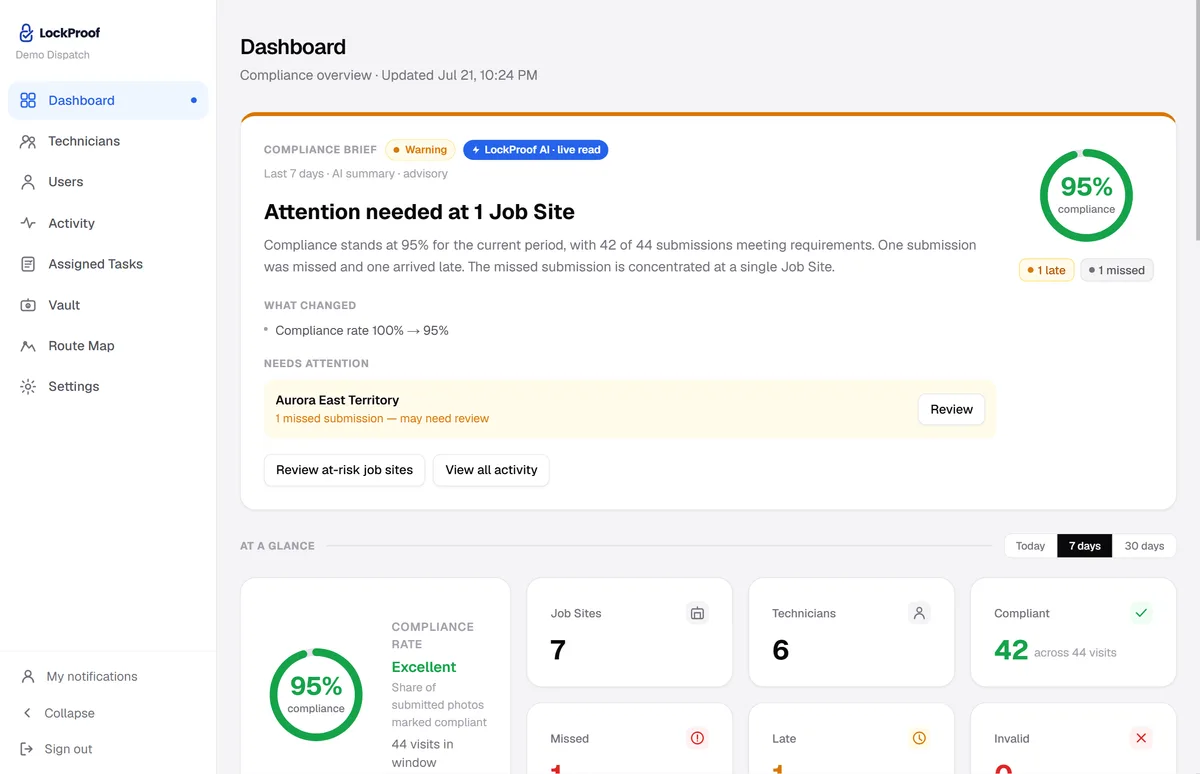
Every route on one screen
Your field workers submit from the field, and this is where it lands: each route sorted as verified, late, or missed, searchable by route and date.
Why LockProof
Why Mobile Workforce & Delivery teams use LockProof
Morning Briefing
Stop checking, start knowing
Every morning, LockProof emails you a compliance briefing covering every route, so you walk into the day already knowing what happened overnight.
☀️ Morning Briefing · 7:00 AM
Client Portal
Give clients a live proof portal
Stop sending PDFs. Give each client a live, branded portal showing real-time compliance across their routes, with one-click proof downloads for any date.
Evidence Vault
When a client asks
And if a client ever asks, the record is already there. Search by route and date, pull the photo, the timestamp, and GPS when it was shared, and share a tamper-evident link in seconds.
A dispute, hypothetically
“Clocked in from the parking lot two blocks away”
Picture a driver or tech who clocks in from a parking lot two blocks from the stop. LockProof records the capture’s GPS against the site’s expected location and flags the distance for a manager to review. It is a flag for a person to check, never an automatic accusation, and the honest stops are left alone. This is illustrative, not a real employee, but it is the accountability question for a route without strapping a tracker to everyone all day: you don’t want continuous surveillance, you want proof each stop actually happened. One live photo at the stop, tied to a place and a sealed time, gives you that without watching a map all shift.
FAQ
Mobile workforce and delivery questions
How do I prove a stop happened without tracking everyone all day?
Each stop sends the worker a link. They take one live photo on arrival, and a server timestamp attaches on submission, with GPS when the worker shares location. You get proof of the stop itself — a record tied to the place and the clock — instead of a live map running on every worker for a whole shift.
What happens when a capture is far from the site?
LockProof checks the photo’s GPS against the site’s expected location and flags a large distance for a manager to review. It is a flag for a person to look at, never an automatic accusation, so an odd stop gets a human check and the routine ones are left alone.
Do drivers need an app or a login?
No. The driver taps a text link and the camera opens. Nothing to install, nothing to remember, and it works in English and Spanish. The link opens a live camera only, so the photo is taken at the stop, not pulled from a gallery afterward.
Can a driver fake a stop photo?
No. Gallery uploads are blocked, reminder timing is randomized, and each capture carries a server-set time and a SHA-256 fingerprint, plus GPS when the worker shares location. A photo can’t be staged in advance or reused for a different stop, and any later change to the record is detectable.
How do I review a whole route quickly?
Every stop posts to one dashboard, marked done, late, or missed, with any flagged distance called out. You review by exception: check what is late, missing, or flagged, and let the proven stops sit, instead of scrubbing a map for the full day.
Ready to get started?
Respect your team's privacy — and still know the job got done.
No obligation. We'll walk you through it live.