Verify field work without tracking
Prove the work, not the worker
What does it mean to verify field work without tracking?
It means proving the work got done without an always-on GPS app on the worker's phone. Instead of a continuous location trail, LockProof captures one live photo per job, with a server-set time recorded only when that photo is submitted, plus the location when the worker shares it. You get proof of the work, not a map of the worker's day.
Does LockProof track your workers?
There is no app installed on the worker's phone, so nothing runs in the background and nothing can follow them between jobs. The phone asks for location only when the worker submits a photo, and the worker chooses whether to share it then. We verify the work, not the worker's whereabouts.
Do workers need to install an app?
No. The worker gets a text, taps the link, and the camera opens. Nothing to download, nothing to log into, and it works in English and Spanish. Because nothing is installed, there is nothing that can run in the background or read their location between jobs.
My workers refuse tracking apps. Does this help?
Yes. There is nothing on their phone to refuse. One photo per job, taken when the work is done, with the location requested only when the photo is submitted. Workers who push back on being followed all shift tend to accept a single photo they can watch themselves take. You still get proof the job happened.
How much does it cost?
LockProof is priced per site, confirmed on a short call. Essentials opens at $99 a month, Professional at $399. What you actually pay tracks how many sites and crews you run, so bring yours to a demo and we will price it against them.
How it works
Four steps, no app on the worker’s phone, nothing to install.
- Schedule the job. The worker gets a text with a link. No app, no login, and nothing running in the background.
- The link opens the camera. The camera roll is off-limits, so the shot is taken on site at the finished job, not chosen from old photos later.
- Location is asked for once, on submission. The phone asks the worker to share location; if they do, it is recorded with a server-set time and sealed into a SHA-256 chain of custody. Never in the background.
- The record is filed. Every job lands on your dashboard, searchable, and shares as one signed link when a client or an auditor asks.
What each verified job carries
- A live photo of the finished job, captured through the link with gallery blocked
- Location captured only at the photo, never in the background or between jobs
- A server-set timestamp the worker cannot change
- A SHA-256 chain of custody on every record
- No app and no login on the worker’s phone, in English and Spanish
- A dashboard that marks each job done, late, or missed
- An Evidence Vault you can search by site, worker, or date
- A shareable signed proof link for a client or an auditor
One screen instead of a location trail
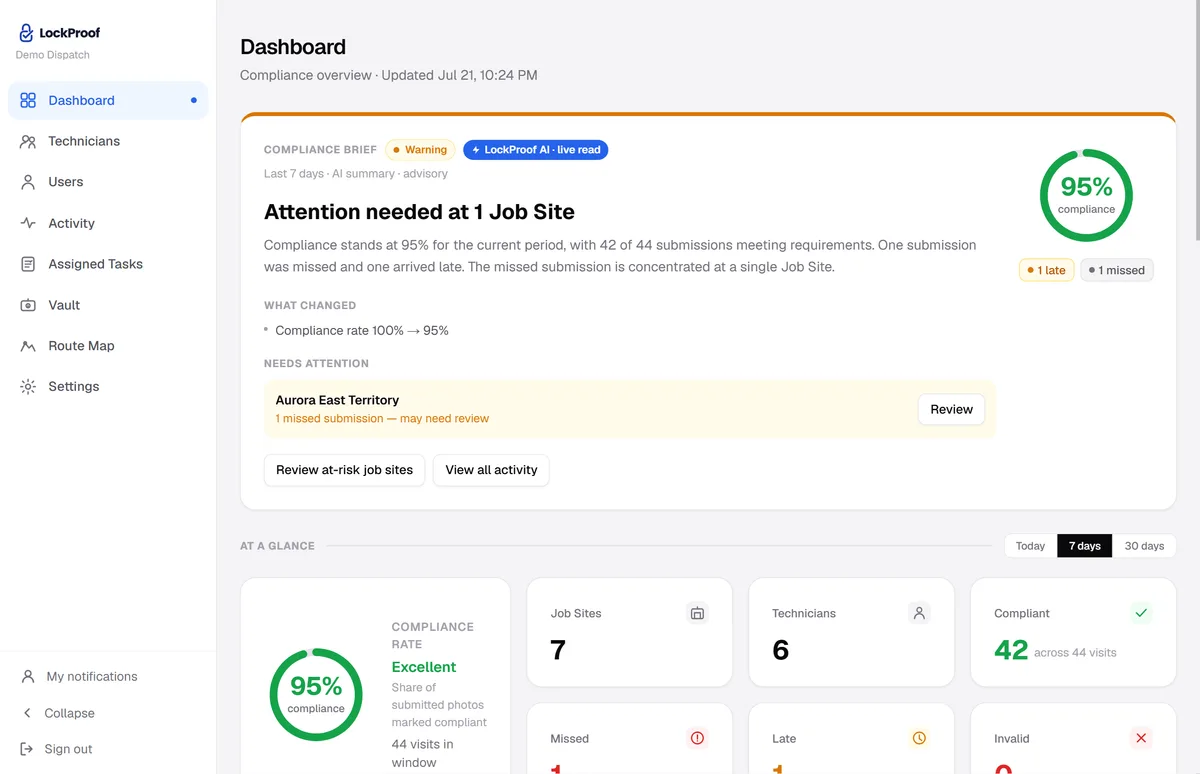
This is what replaces the tracking map. Each job sorts itself as verified, late, or missed, with a photo behind every one — so you learn the work happened without following anybody between jobs.
Why a record at the job beats a trail
The dispute is almost always the same: did someone bill for hours at a place they weren’t? In 2024 a North Carolina police sergeant was charged with 12 counts of fraud for falsifying time sheets on an off-duty security job at a Fayetteville shopping center — accused of claiming pay for shifts he wasn’t there for, more than $20,000 in all. The charges are allegations that have not been proven in court (WRAL, ABC11). You don’t need an app trailing a whole crew all shift to settle that question. One live photo taken at the job, filed with a sealed time — and the location when the worker shares it — is a record an honest worker and a manager can both point to — proof the shift happened, not a map of where a phone went.
Is it legal to track employees by GPS?
Employee-location monitoring is regulated, and the rules vary from state to state. Some require notice or consent, and some are stricter than others. LockProof does not give legal advice, and this is not it — check your own obligations with a professional. If you want to read the statutes rather than summaries of them, we keep a primary-source reference of the employee monitoring notice laws by state — it links the primary text of every statute it details and carries a visible last-updated date.
Here is the practical point. Asking for a location once, when a worker submits a photo, is a far smaller privacy footprint than an app that reads location continuously in the background. You are recording that a job was done, not building a trail of where someone went all day.
Always-on tracking vs. one photo per job
An always-on GPS app runs on the worker’s phone and reads location continuously. LockProof does not run on the phone at all. Here is what each one actually does.
| What it does | LockProof | Always-on GPS tracking app |
|---|---|---|
| On the worker’s phone | Just a text link | An installed app |
| When location is read | Only at the photo | Continuously, in the background |
| Between jobs | Nothing is installed to read it | The app can still read location |
| What you get | Proof the job got done | A trail of where the phone went |
| Proof of the actual work | Live photo, sealed time, GPS when shared | No |
See a finished example in a sample verified record, or how it fits field service teams. LockProof verifies the work, not the worker’s whereabouts. And if a client ever disputes a job, the proof is already on file, dispute-ready. See all the alternatives compared.