Property Management
Run your Property Management field work. Every job verified.
Schedule every lock-up, unit turn, and inspection across your buildings once. LockProof sends the link at a randomized time so photos can’t be staged, and each check comes back as a live photo you can search by site, super, or date. No app download. No hardware. Just a link.
Last updated July 9, 2026
Verified record
Superintendent · Building
Live photo
Captured by superintendentScheduled link
Gallery blocked
Attached automatically; GPS when shared
Tamper-evident
How it works
How it works for Property Management
Add your buildings
Enter each building you want to monitor. Takes 60 seconds.
Assign superintendents
Add each superintendent with their phone or email. Set reminder schedule.
Automatic reminders
LockProof texts or emails your superintendents on schedule. No action needed.
Photo proof collected
Superintendents submit a live photo, GPS-tagged when they share location. It's stored forever.
What you get
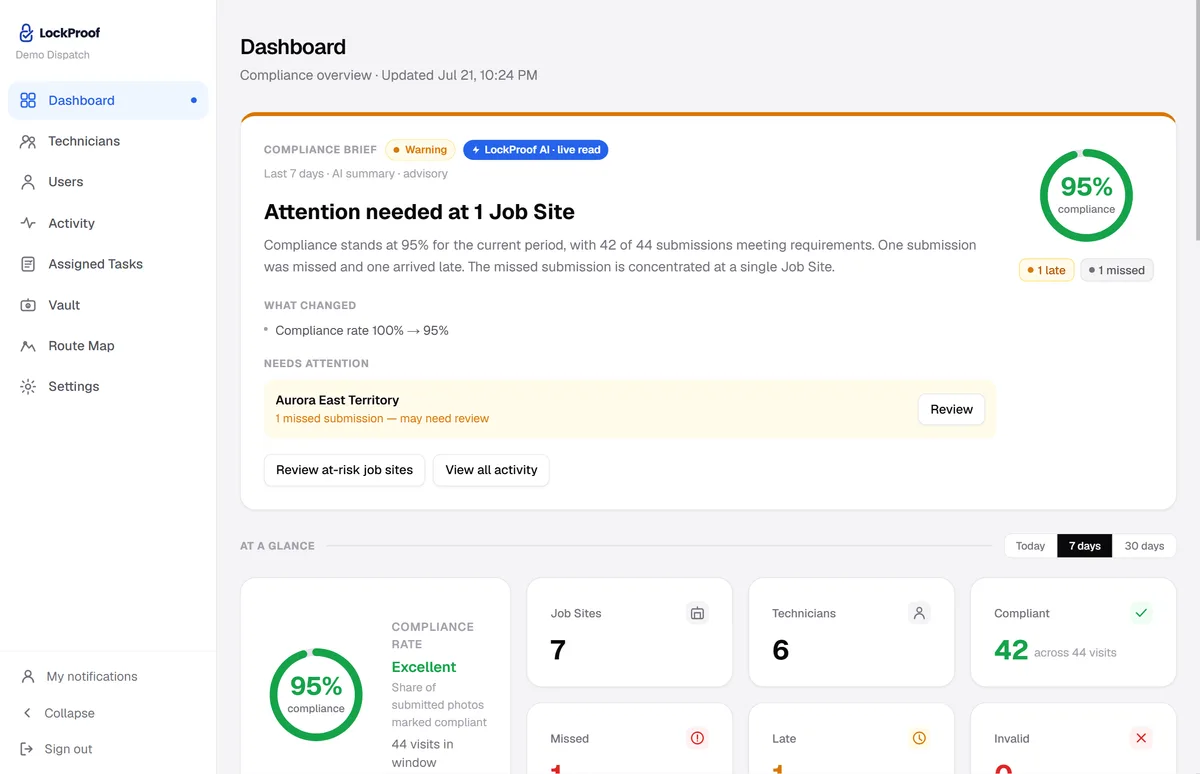
Every building on one screen
Your superintendents submit from the field, and this is where it lands: each round sorted as verified, late, or missed, searchable by building and date.
Why LockProof
Why Property Management teams use LockProof
Morning Briefing
Stop checking, start knowing
Every morning, LockProof emails you a compliance briefing covering every building, so you walk into the day already knowing what happened overnight.
☀️ Morning Briefing · 7:00 AM
Client Portal
Give clients a live proof portal
Stop sending PDFs. Give each client a live, branded portal showing real-time compliance across their buildings, with one-click proof downloads for any date.
Evidence Vault
When a client asks
And if a client ever asks, the record is already there. Search by building and date, pull the photo, the timestamp, and GPS when it was shared, and share a tamper-evident link in seconds.
Task-level proof
Every task in the building, traced on its own
A single “the super was here” check-in does not tell you which jobs got done. LockProof tracks each assigned task separately: the boiler room, the lobby, a unit turn. Each one carries its own live photo and timestamp, plus GPS when the worker shares location. Messages about a task live in a separate Task Thread, alongside the record and never inside it.
One building, four tasks
FAQ
Property management questions
How does LockProof prove a super or vendor did a building check?
Each check goes out as a scheduled text link. The worker opens a live camera, takes the photo, and LockProof attaches a server timestamp plus GPS when the worker shares location. The check lands on your dashboard as a time-stamped record, and any miss is flagged before an owner or tenant notices.
Can I track each task in a building separately?
Yes. Assign tasks individually: boiler room, lobby, stairwell, a unit turn. Each one comes back as its own verified record with its own photo and timestamp, plus GPS when the worker shares location. You can pull a single task months later without digging through a group chat.
What do I show an owner or tenant who disputes a visit?
Search the Evidence Vault by building and date, open the exact visit, and share a tamper-evident link with the photo, timestamp, event history, and GPS when it was shared. It is audit-ready. No screenshots, no scrolling through old texts to reconstruct what happened.
Do superintendents need to install an app?
No. Supers and vendors get a text link and tap it. The camera opens, they submit. Nothing to download, nothing to log into. It works in English and Spanish, which matters for a lot of building staff.
More on proving field work: how to verify a vendor showed up and keeping dispute-ready contractor completion records. The software for this is photo proof software for property managers; for work orders specifically, see work order verification software. Weighing your options? See how LockProof compares to other photo verification apps. And for the reasoning behind all of it, our founder wrote up why worker-chosen photo proof kept failing at a single property management company.
Ready to get started?
Build dispute-ready building records automatically, on timing no super can predict.
No obligation. We'll walk you through it live.