Property management
Photo proof software for property managers
How much does photo proof software cost?
LockProof is priced per building and confirmed on a short call. Essentials starts at $99 a month, Professional at $399; Enterprise is custom. What you pay tracks how many buildings and workers you run — a two-property manager and a 40-site portfolio are not the same bill. Book a demo and we will price it against your own portfolio.
Do the super and my vendors need an app or a login?
No. They tap a link in a text and the camera opens. There is no app to sideload onto a super’s phone and no password a vendor forgets between jobs. It works in English and Spanish. The link opens a live camera, so the photo is taken standing in the unit, not pulled from a camera roll back at the shop.
How is this different from a photo app my crew uploads to?
A photo-upload app waits on the worker: the super opens it and adds pictures when he gets to it, often from his gallery days later. LockProof drives the job instead. It texts the link at the scheduled time, opens a live camera, and seals each capture with a server-set time and a chain of custody, so a make-ready or a work order files as a record you can defend, not a folder you have to keep organized.
Can a worker reuse an old photo or stage one?
The link opens a live camera and blocks the camera roll, so last month’s shot of a clean unit can’t stand in for this turn. Reminder timing is randomized, so a vendor can’t take the “after” photo before the work is done. Every capture carries a server-set time the worker cannot change and a SHA-256 chain of custody, so any later edit to the record shows.
What do I send an owner or a tenant during a dispute?
One signed link. It shows the live photo, the sealed time, the full event history, and the GPS location when the worker shared it, as one tamper-evident record, filed by building and date. Instead of arguing over whether the boiler was actually serviced or the unit was actually turned, you send the record and the question is settled.
How a job gets verified
Four steps, and nothing for the super or the vendor to install.
- Schedule the job. Set the unit turn, the vendor visit, or the building walk. The worker gets a text with a link at the right time. No app, no login.
- The link opens the camera. It’s a live camera, so the photo is taken standing in the unit, not chosen from a camera roll later.
- The capture is sealed. On submission, a server-set time attaches — with GPS when the worker shares location — held under a SHA-256 chain of custody so any later change to the record shows.
- The record files itself. Every job lands on your done/late/missed dashboard, searchable by building, worker, or date, and shares as one signed link the moment an owner or a tenant asks.
What each verified job carries
- A live photo of the finished unit or repair, taken through the link with the camera roll blocked
- GPS recorded on submission when the worker shares location, flagged for you if it lands beyond a set distance from the building address
- A server-set timestamp the super or the vendor cannot change
- A SHA-256 chain of custody on every job record
- Randomized reminder timing, so an “after” photo can’t be taken before the work is done
- A done/late/missed dashboard across every building you run
- An Evidence Vault you can search by building, worker, or date
- A signed proof link to drop into an owner’s report or hand a tenant
- No app on the super or vendor’s phone, and no login, in English and Spanish
Every building on one screen
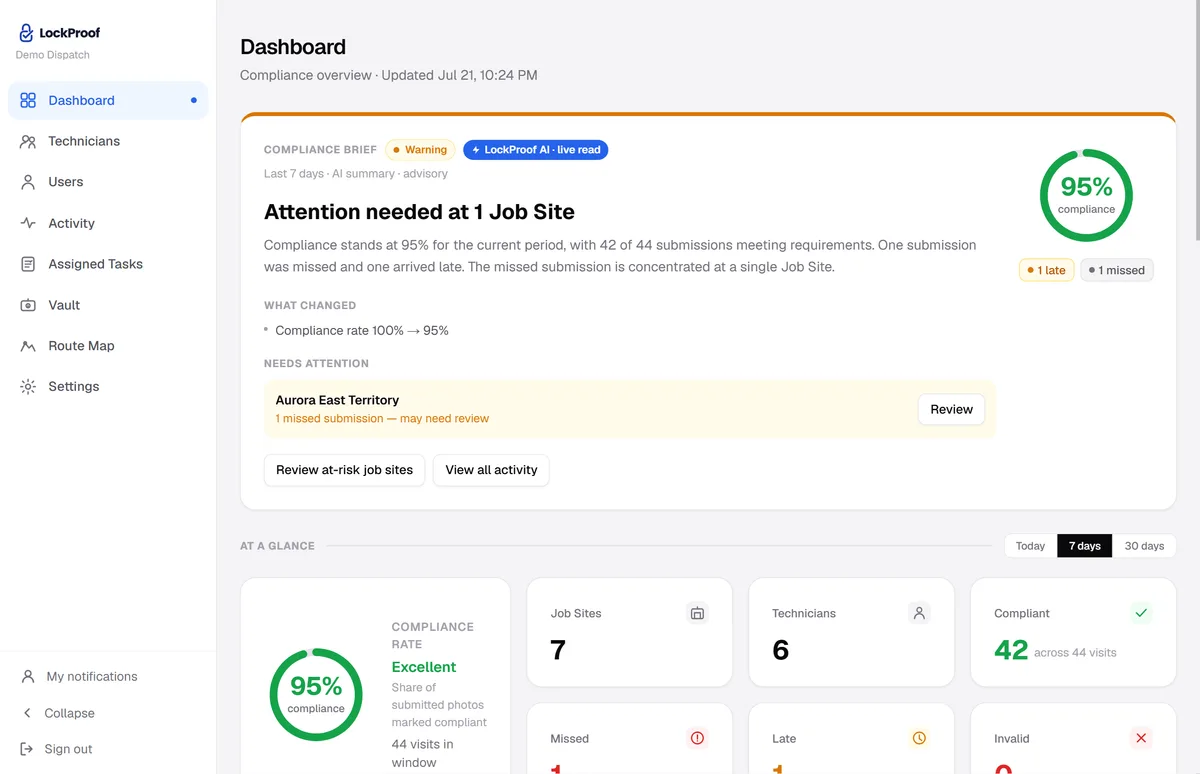
Supers and vendors submit from the field and it lands here, sorted as verified, late, or missed and searchable by building and date — which is the view you want open when an owner asks about one specific week.
Why a per-job vendor record matters now
Repair and maintenance spending is where a building’s money leaks, and the fraud around it gets prosecuted. In February 2024 federal prosecutors charged 70 current and former New York City Housing Authority employees in a single sweep for taking bribes to hand out small building-repair contracts without competitive bids; all 70 were convicted (U.S. Attorney’s Office, S.D.N.Y.). The tally was more than $2.1 million in bribes on over $15 million of repair work: no-bid steering, and jobs billed whether or not the work matched the invoice. You don’t have to be anywhere near that to feel the scrutiny it creates. When an owner or an auditor asks what a vendor actually did on a work order, an honest property manager needs a per-job photo record of what was done, at which unit, on what date — not a paper invoice and a memory. A live photo, filed with a sealed time — and the location when the worker shares it — before anyone asks, is that record: audit-ready and dispute-ready.
A photo-upload app vs. sealed photo proof
Most photo tools built for property management are worker-driven organizers: the crew opens an app and adds pictures to a folder. That is fine for a project log. It is a different thing from a record that holds up when an owner questions a make-ready or a tenant says the repair never happened. Here is what each one does.
| LockProof | A photo-upload app | |
|---|---|---|
| On the super’s phone | Just a text link | An installed app |
| Who starts the capture | The system, at the scheduled time | The worker, when he gets to it |
| Where the photo comes from | Live camera only, camera roll blocked | Camera or camera-roll upload |
| Time on the record | Server-set and sealed | The phone’s, editable |
| If the record is later edited | SHA-256 chain of custody flags it | Usually invisible |
| Hand it to an owner or a tenant | One signed proof link | Export a report |
See what one finished record looks like in a sample verified record, or how the same loop runs across your property management portfolio. And if a job is ever disputed, the proof is already filed, dispute-ready.