Commercial Cleaning
Run your Commercial Cleaning field work. Every job verified.
Every clean across your sites works one way: cleaners get a text, snap a photo when it's done, and it comes back as a verified, tamper-evident record you can show any client. No app download. No hardware. Just a link.
Last updated November 11, 2026
14 days. No card needed.
Today 9:40 PM
Hi Rosa Lima, please verify your clean at Alder Court Offices. Submit a live photo: https://lockproof.com/s/
- Site
- Alder Court Offices
- Cleaner
- Rosa Lima
- Server-set time
- Jun 10, 9:43 PM
- Location
- Shared by the worker
- Fingerprint (SHA-256)
- 9f2c41ab…e8d81a
Illustration. The people and places are invented.
How it works
How it works for Commercial Cleaning
1.
Add your sites
Enter each site you want to monitor.
2.
Assign cleaners
Add each cleaner with their phone or email. Set reminder schedule.
3.
Automatic reminders
LockProof texts or emails your cleaners on schedule. No action needed.
4.
Photo proof collected
Cleaners submit a live photo, GPS-tagged when they share location. It's kept on file with the record.
What you get
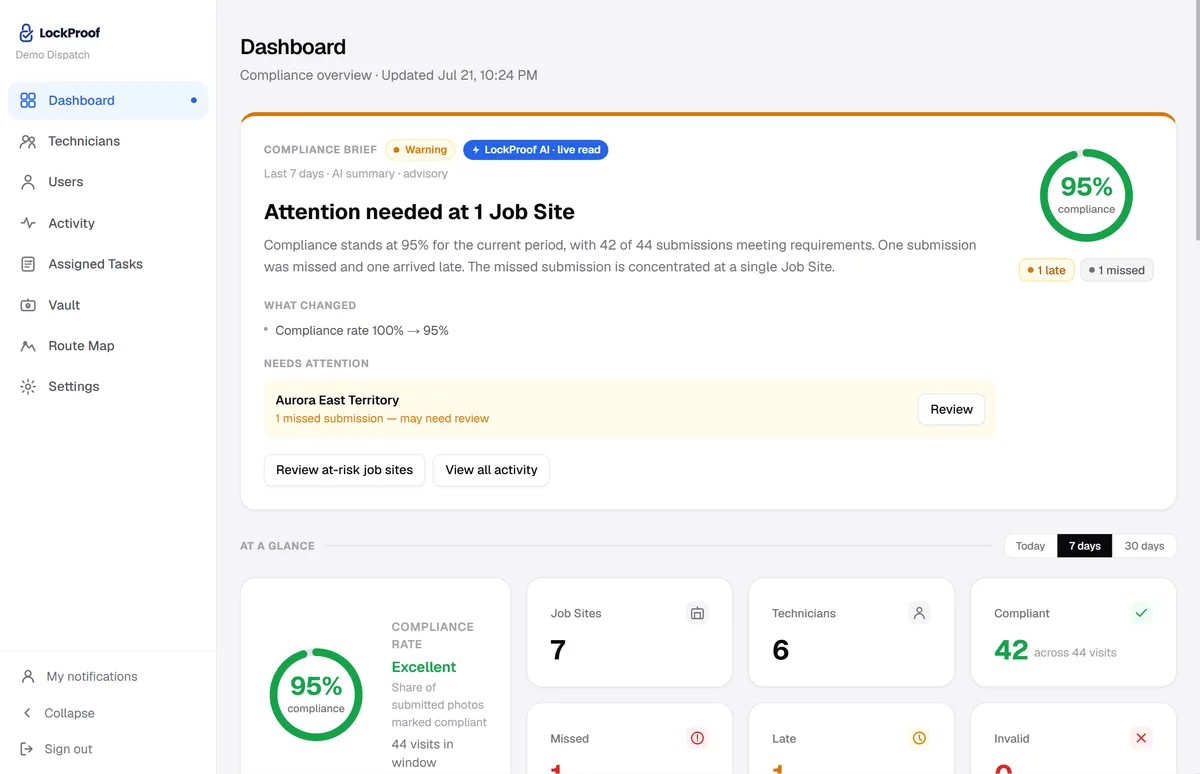
Your sites on one screen
Your cleaners submit from the field, and this is where it lands: verified, late, and missed work at a glance, searchable by site and date.
Why LockProof
Why Commercial Cleaning teams use LockProof
- Cleaners tap a text and shoot a live photo of the completed area, gallery blocked
- A server timestamp attaches on submission (GPS when shared), so the record can’t be back-dated
- No app for cleaners and no logins to hand out, just a link that expires
Client Portal
Give clients a live proof portal
Stop sending PDFs. With the client portal on, give each client a portal link, no account needed, that shows their sites and the share of checks verified at each over the last 30 days.
- Per-client portal
- Share of checks verified, per site, last 30 days
- Each client sees only what’s theirs
- No client account needed
Evidence Vault
When a client asks
And if a client ever asks, the record is already there. Search by site and date, pull the photo, the timestamp, and GPS when it was shared, and share a tamper-evident link.
- Dispute search
- Shareable proof links
- Audit record kept on file
- Tamper-evident format
A dispute, hypothetically
“The night crew skipped the third floor”
Say an office manager insists your night crew skipped the third floor, and wants a credit. Without a record, it is their word against your cleaner’s memory, and you usually eat the complaint. With LockProof, each floor came back as a timestamped photo, with the building’s location when the cleaner shared it. You open the third-floor record, see its photo was submitted at 11:40 PM, and the conversation is over. This is illustrative, not a customer story, but it is the ordinary shape of a cleaning dispute: the client remembers one thing, the crew remembers another, and the file holds nothing that settles it. A live photo with a sealed time, and the place when the cleaner shares it, moves the record off memory and onto the clean itself.
FAQ
Commercial cleaning questions
How do I prove my cleaners actually cleaned a site?
Each clean goes out as a scheduled text link. The cleaner opens a live camera, takes the photo, and LockProof attaches a server timestamp plus GPS when the worker shares location. The clean lands on your dashboard as a time-stamped record you can pull up by site and date, so a client’s doubt meets a photo, not a memory.
A client says we skipped their office. What do I show them?
Search the Activity Log by that site and date, open the exact clean, and share a tamper-evident link with the photo, the sealed time, and GPS when it was shared. It is audit-ready. No scrolling through old texts, and no credit issued for work that was actually done.
Do cleaners need to download an app?
No. Your cleaner taps a text link and the camera opens. Nothing to install, nothing to log into, and it works in English and Spanish. The link opens a live camera only, so the photo is taken live, not pulled from a camera roll afterward.
Can a cleaner reuse an old photo to fake a clean?
No. The link blocks gallery uploads and opens the live camera directly, and on a random schedule the reminder time is picked inside the hours you set. Every submission carries a server-set time the cleaner cannot change and a SHA-256 fingerprint, so any later edit is detectable.
How does this help me keep a client account?
It turns “trust us, we cleaned it” into a record you can show. With the client portal on, give each client a live portal with their sites’ compliance, and when they question a night, the proof is already filed. The honest crews stop paying for the arguments, and the account has less to fight about.
Ready to get started?
Hand every client dated, tamper-evident proof of each clean, automatically.
14 days. No card needed.
No obligation. We'll walk you through it live.