The proof loop
How do you know the work actually happened?
LockProof turns one text and one live photo into a record that holds up when someone asks.
How it works
The 60-second proof loop
Here is how one visit becomes a record you can stand behind. The same loop runs on every job, in about a minute, with no chasing and no paperwork after the fact.
- 7:00 PM
The text arrives
Your super's phone buzzes at the scheduled time. No app to install, no login to remember, just a text with one link. They tap it on the way to the door, and the only thing waiting is a camera.
- 7:12 PM
The camera opens
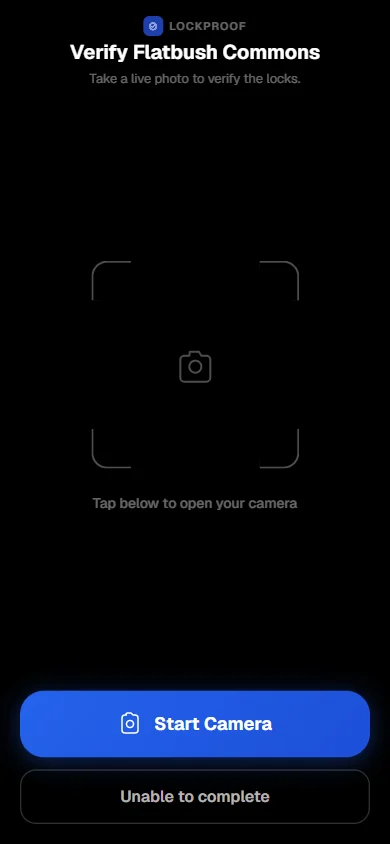
The link opens straight to the camera. The worker taps Start Camera. No camera roll, no gallery, no way to attach a shot from yesterday. The photo has to be taken right now, on site.
The worker screen: the reminder link opens a live-camera capture. Start Camera, no gallery, no upload. - 7:14 PM
The record seals itself
On submission, LockProof attaches a server timestamp the worker can't set and a SHA-256 chain of custody, plus GPS when the worker shares location. Nothing gets typed in later. The record seals itself and files where you can find it.
- 7:14 PM
You see it live
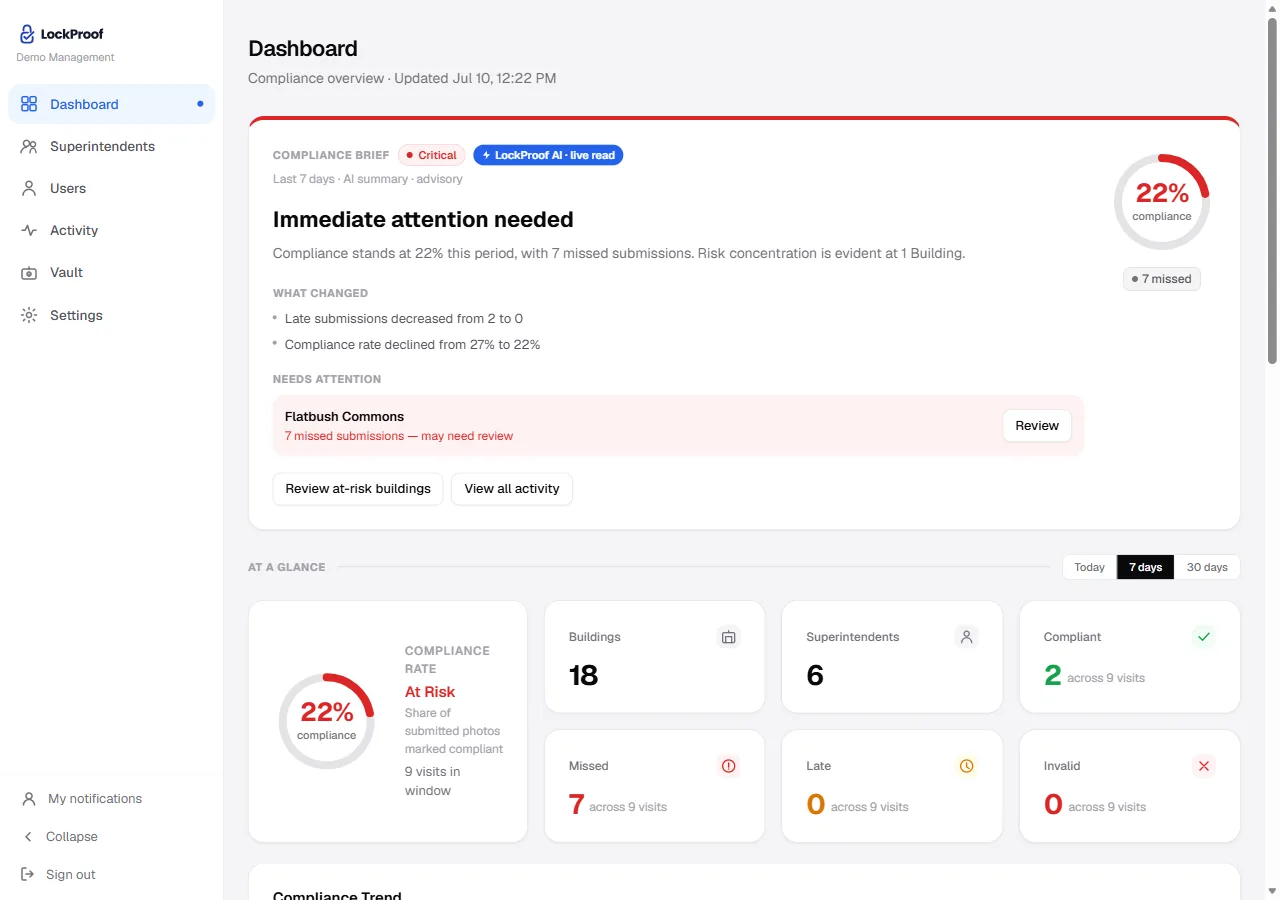
It lands on your dashboard as it happens: verified, late, or missed, building by building. Nothing to chase. And when a client or an insurer questions the work months later, the record is already filed, dispute-ready.
Your dashboard: verified, missed, and late visits at a glance, with at-risk buildings flagged.
Want to see what one finished record looks like?
See a sealed recordThe guides below are written straight. For the version with the reasoning and the false starts in it, our founder wrote up what a work record needs before it settles a dispute.
Start here
Worth reading first
A completion sign-off is not proof the job got done
Proof of completion for field service is the finished job captured live — photo and a server-set time, plus GPS when the worker shares location — not a checkbox on a work order.
Read →Property managementHow to prove a contractor did the work
Prove the work got done, not just that a bill arrived — each job comes back as its own verified record.
Read →Home careHow to verify a caregiver showed up
A clock-in records a claim, not the visit. Capture the task with a live photo and a server-set time recorded on submission — plus the location when the caregiver shares it — alongside the EVV system you already run.
Read →Property managementHow property managers prove work to owners
A financial report shows the money moved, not that the job got done — how property managers show owners the work itself, with a dated, located photo record.
Read →Property managementLockProof for property management
Verify building checks, unit turns, vendor visits, and lock-ups — each job filed as a dated, tamper-evident record you can pull by site.
Read →Guides
Every guide on proving field work
Pennsylvania EVV requirements, layer by layer
Pennsylvania’s EVV rules from DHS sources read October 8, 2026: an open model feeding the DHS Aggregator, location by one of four methods, and the 85% floor MA Bulletin 05-24-01 sets for dates of service from January 1, 2025. LockProof is not an EVV system; never legal advice.
Read the guide →EVV requirements by state: how they differ
From January 1, 2020 for personal care and January 1, 2023 for home health, 42 U.S.C. § 1396b(l) reduces part of a state’s federal Medicaid match when it does not require electronic visit verification, unless it is exempt from that reduction because it has required one for both services continuously since December 13, 2016; a separate good-faith exemption covered only 2020 and 2023. Which states we cover, and how they differ on GPS and system models. LockProof is not an EVV system; never legal advice.
Read the guide →Ohio EVV and GPS: what 2026 actually requires
Ohio RC 5164.42 took effect October 6, 2026, directing GPS-based verification inside the EVV standards Ohio Medicaid sets, except for a family caregiver at the same residence. Ohio Medicaid’s September 28, 2026 deck says current rules stay in place until revised rules it anticipates for July 1, 2027. LockProof is not an EVV system; never legal advice.
Read the guide →Pennsylvania's EVV manual-edit threshold
What Pennsylvania's MA Bulletin 05-25-03 says: 85% of EVV visit records verified without manual edits, quarterly alerts above 15%, a corrective action plan after two bad quarters. Bulletin linked. LockProof is not an EVV system; never legal advice.
Read the guide →Employee monitoring notice laws by state (2026)
What the four state employee-monitoring notice statutes — New York, Connecticut, Delaware, Maine — say in 2026, plus California's died AB 1355, with the primary source linked for every statute it details. Describes the statutes; never legal advice.
Read the guide →How to prove a caregiver visit happened
A contested home-care visit turns on who authored each field of the record. What EVV is required to carry, what an agency can still assemble once a complaint is open, and why the time is the field worth moving off the phone.
Read the guide →Contractor says the work is done, but it is not
Every page in a completion file was written by the party being paid. How to check the claim against the contract, why covered-up work has a deadline, and which field to move off the crew’s phone.
Read the guide →What a photo verification code checks
A photo verification code checks that a file is unchanged since it was sealed. That is integrity; origin is a separate question about where the record started.
Read the guide →Notes from building LockProof: what actually proves a vendor showed up
Founder notes: why “send me a photo” kept failing, and the five properties a work record needs before it settles a dispute — including the two limits worth stating plainly.
Read the guide →When a customer says the technician never came
The closed ticket is your own company describing its own work, which is why it settles nothing. What a location clock-in records, what it leaves out, and which record ends the argument.
Read the guide →How to prove snow removal was done
Snow work erases itself, so the dispute is always about the record: what a route sheet rests on, why the arrival time is the contested field, and how to move that one field out of the truck.
Read the guide →Senior living vendor accountability
Read your own vendor file the way a surveyor will: every element on a work order has one author. What it takes to put a second one in there.
Read the guide →Vendor work verification for multifamily
Vendor credentialing proves a vendor was allowed onto the property. It does not show the work was done — and in multifamily those are two different files.
Read the guide →How to document maintenance work for an insurance claim
Documenting maintenance work for an insurance claim takes two records, not one: the damage, and the repair history behind it — dated by a server, not by the phone that took the photo.
Read the guide →When a tenant claims the repair wasn't completed
When a tenant claims a repair was not completed, the dispute comes down to documentation, not memory — a dated, sealed record of the work carries further than an editable phone photo.
Read the guide →How to verify a unit turnover was completed
A make-ready sign-off is the crew’s own word — verify each turnover job at the unit with a live photo and a server-set time, plus GPS when the worker shares location, not just a checked box.
Read the guide →Vendor documentation checklist for property managers
A tool-agnostic checklist of what to document before, during, and after any vendor visit: scope, arrival, work photos, completion, invoice match, and retention.
Read the guide →How to win a chargeback with photo proof
A "service not rendered" chargeback is decided by whether you can show the work was done. A self-authored invoice is weak; a sealed live photo of the finished job is dispute-ready.
Read the guide →How to verify a caregiver showed up
A clock-in records a claim, not the visit. Capture the task with a live photo and a server-set time recorded on submission — plus the location when the caregiver shares it — alongside the EVV system you already run.
Read the guide →Verify field work without tracking employees
Check the work, not the worker: point-in-time photo proof records a sealed time on submission — plus GPS when the worker shares location — with nothing installed on your crew’s phone.
Read the guide →How to prove a photo is real in the AI era
Why looking, AI detectors, and metadata all fail to prove a photo is real — and what holds up: live-only capture, sealed on submission with a server-set time.
Read the guide →How property managers prove work to owners
A financial report shows the money moved, not that the job got done — how property managers show owners the work itself, with a dated, located photo record.
Read the guide →Maintenance photo documentation that holds up in a dispute
Maintenance photo documentation for property managers that holds up in a dispute — a live photo with a sealed time and GPS when shared, filed by unit and date.
Read the guide →A completion sign-off is not proof the job got done
Proof of completion for field service is the finished job captured live — photo and a server-set time, plus GPS when the worker shares location — not a checkbox on a work order.
Read the guide →How to prove a contractor did the work
Prove the work got done, not just that a bill arrived — each job comes back as its own verified record.
Read the guide →Get proof the job was completed, task by task
Get proof the job was completed, one task at a time — each with its own evidence-grade record and chain of custody.
Read the guide →How property managers verify a vendor showed up
Capture time-stamped proof a vendor actually showed up to a site — with GPS when they share location — when a group-chat photo won't hold up.
Read the guide →Keep dispute-ready contractor completion records
Keep tamper-evident records of every finished job, searchable by site and date the moment a claim lands.
Read the guide →FAQ
Straight answers
Do workers need to install an app?
No. The worker gets a text with one link and taps it. The camera opens, they take the photo, and it submits. Nothing to download, no login, no training. It works the same on any phone.
Can someone submit an old photo?
No. The link opens the live camera directly and blocks gallery uploads, so a worker cannot attach a shot from the camera roll. Reminder timing is randomized, and every capture is sealed with a server timestamp and a SHA-256 fingerprint, plus GPS when the worker shares location.
Is the chat part of the evidence?
No. Each task has a Task Thread where the office and worker trade notes and questions. It sits alongside the record for communication only. Messages are never mixed into the tamper-evident record itself.
See it on your own sites
Book a demo and we’ll run the proof loop on your buildings, your crews.