Home care visit verification app
Verify every home care visit with a photo
Do I still need my EVV system?
Yes. Medicaid-funded agencies must keep their certified EVV system as the system of record — LockProof does not replace it and is not a substitute for EVV compliance. It sits alongside your EVV as the visit’s photo-proof layer: a live photo of the visit with a sealed time — and GPS when the caregiver shares location — your office and the family can both see.
What is a home care visit verification app?
It records that a home care visit really happened. The caregiver taps a text link, takes a live photo at the client's home, and it is filed with a server-set time, and GPS when the caregiver shares location. Not a clock-in that says a phone was nearby — a photo that shows the visit, sealed so it holds up if a payer or a family asks later.
How is this different from an EVV clock-in?
An EVV clock-in proves a phone was near the address at a time. It says the caregiver arrived; it does not show the visit or the care. LockProof captures a live photo of the visit itself, with a sealed time and GPS when the caregiver shares location, so you can show what happened, not only that someone checked in.
Do caregivers need an app or a login?
No. The caregiver taps a link in a text and the camera opens — nothing to download, no password to forget, and it works in English and Spanish. The link opens a live camera only, so the photo is taken at the client's home, not chosen from a camera roll later. One tap per visit.
Can a visit or its photo be faked?
The link opens a live camera only, and gallery uploads are blocked, so an old photo can't be attached. Reminder timing is randomized, so a visit can't be staged early. Every photo carries a server-set time the caregiver cannot change and a SHA-256 fingerprint, so any later edit to the record is detectable.
Can a family see that the visit happened?
Yes. Each visit is filed as a record you can share as one signed link. Send it to a son or daughter and they see the live photo, the place, and the time, without a phone call. If a family or a payer ever disputes a visit, the proof is already on file, dispute-ready.
How a visit gets verified
Four steps, and nothing for the caregiver to download.
- Schedule the visit. The caregiver gets a text with a link — no app, no password to forget.
- The link opens the camera. It’s a live camera only, so the photo is taken at the client’s home, not chosen from a camera roll.
- The record is sealed. The photo is filed with a server-set time, and GPS when the caregiver shares location, fingerprinted with SHA-256 so any later change to it shows.
- Share it. Every visit lands on your dashboard, searchable, and shares as one signed link the moment a family member or a Medicaid auditor asks.
What each verified visit carries
- A live photo of the visit, taken through the link with the gallery blocked
- GPS recorded on submission when the caregiver shares location, flagged for you if it lands beyond a set distance from the client’s address
- A server-set timestamp the caregiver cannot change
- A SHA-256 chain of custody on every visit record
- Visit check-in and check-out, without following the caregiver between visits
- A dashboard that marks each visit done, late, or missed
- An Evidence Vault you can search by client, caregiver, or date
- A shareable signed proof link for a family member or a payer
- No caregiver app or login, in English and Spanish
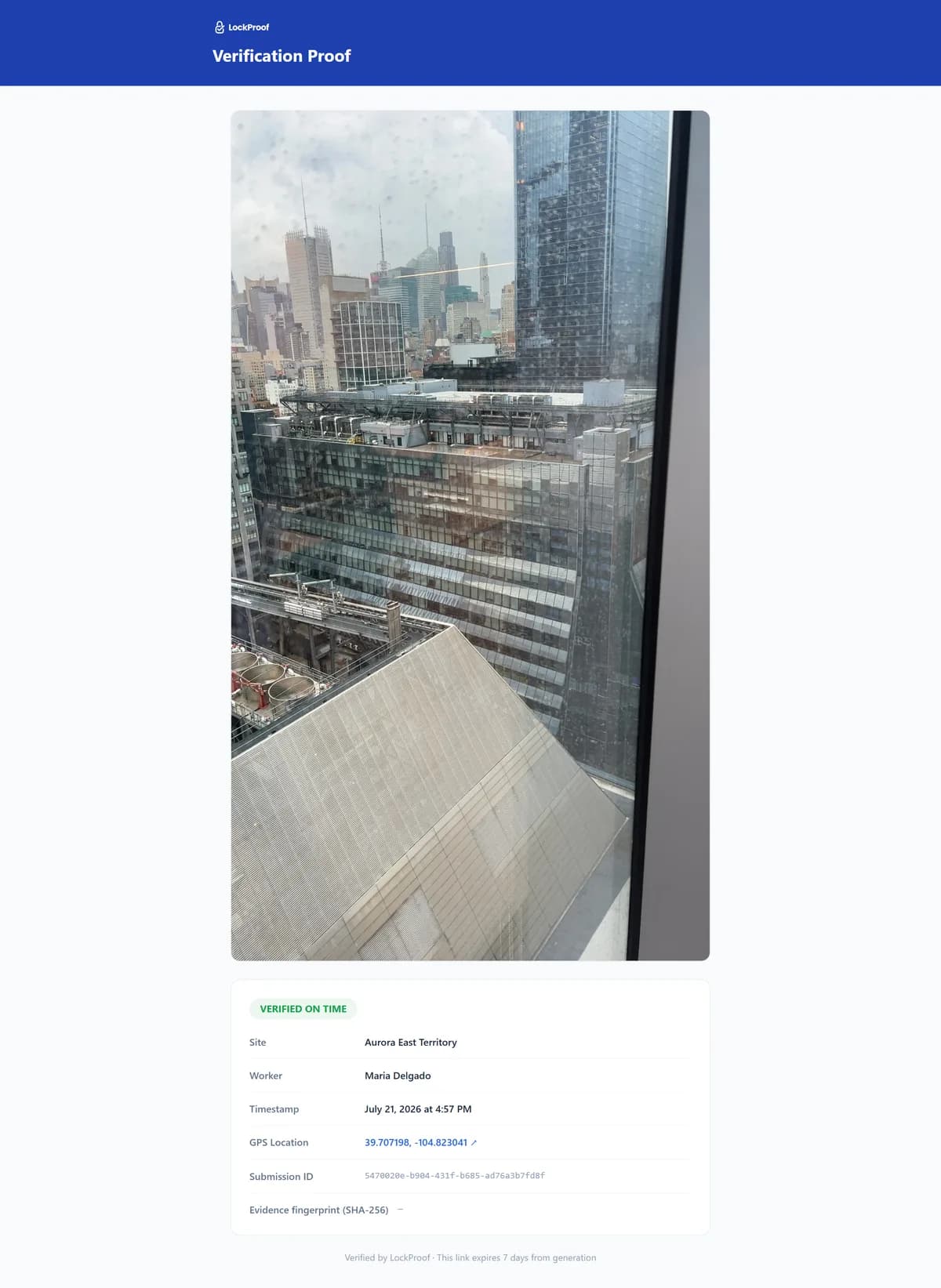
What a finished visit files as
Every visit lands like this: a live photo taken at the home, a time the office sets rather than the caregiver, and a SHA-256 chain of custody, with GPS when the caregiver shares location. It is what a family member sees instead of being asked to take anyone at their word.
Why a visit record matters now
Visit-billing fraud is prosecuted, and the scrutiny lands on honest agencies too. In 2023 the owner of a New York licensed home-care agency was sentenced to 54 months in federal prison for billing Medicaid more than $100 million for personal-care visits that were never made — aides logged as working while they were home, running errands, or on vacation (U.S. Attorney’s Office, S.D.N.Y.). Cases like that raise the bar for everyone: when a payer or a family asks whether a visit really happened, an agency needs a record of the visit, not just a clock-in that a phone was nearby. A live photo, filed with a sealed time — and the location when the caregiver shares it — is that record — on file before anyone asks, dispute-ready.
A clock-in vs. a visit you can show
An EVV clock-in is built to bill Medicaid: it records that a caregiver arrived. That is a different job from showing the family the visit happened. Here is what each record actually carries.
| What the record carries | LockProof | An EVV clock-in |
|---|---|---|
| A live photo of the visit | Yes, captured live | No |
| Shows the care, not the arrival | The photo shows it | Arrival |
| Location | GPS when shared | GPS at clock-in |
| Time | Server-set | Clock-in time |
| Where the record can be opened | A shareable link | Inside the EVV system |
| A family can see it | One signed link | No, it is for billing |
| Ready if a visit is disputed | The photo record | The log |
See a finished example in a sample verified record, or how it fits home care teams. LockProof sits alongside whatever you use for billing. It is the proof each visit happened, ready the day a family or a payer asks. Weighing your options? Compare the visit-proof options.