Photo evidence software for customer disputes
When a customer disputes the job, show the record
What is photo evidence software for customer disputes?
It is software that turns a finished job into a photo record instead of a line on an invoice. With LockProof, each submission lands as a live photo carrying a server-set arrival time, a SHA-256 chain of custody, and GPS attached whenever a worker shares location, stored under its site and its date.
Will a photo actually settle a dispute?
It changes what the argument runs on. A sealed record shows the photo was taken live through the link, at a time the server wrote, not the phone, and that the image has not changed since. What it does not do is vouch for the scene in front of the camera, or prove that the job was done right.
Do my workers have to download an app?
No. The worker gets a text, taps the link, and the phone browser opens the camera. Nothing gets installed, no account gets created, and there is no password for anyone to forget on a Saturday. Worker screens read in English or Spanish.
Can somebody stage the photo or back-date it?
Tapping the link starts a live camera, and the gallery is not on offer, so last month’s picture cannot be passed off as today’s. The clock is not the phone’s either. The server writes the time when the submission lands, and altering the photo afterward makes the SHA-256 seal stop matching.
How much does photo evidence software for customer disputes cost?
Pricing is per site, and we set it on a call rather than off a price list. Plans open at $99 a month for Essentials and $399 for Professional, and where you land depends on how many sites and workers you run. A demo is where we put a number on it.
How it works
Four steps, start to filed. Your worker downloads nothing.
- Send the job. Put it on the schedule or fire it off by hand. Either way the worker gets a text holding one link.
- Live capture is the only way in. Tapping the link opens the camera, and the gallery is not on the menu, so nobody can reach back for a shot from another day.
- The record seals as it lands. The server writes the arrival time, out of the worker’s reach, and a SHA-256 fingerprint closes over the image, that time, and the coordinates when the worker shares location.
- Then it waits. The job sits filed under its site and its date. Months on, when somebody says it never happened, you send one signed link instead of an explanation.
What ends up on file
- The finished work photographed live through the link, with no gallery to reach into
- A time the server writes when the photo arrives, not one the phone in a pocket chose
- A SHA-256 chain of custody closing over the image and that time, plus the coordinates when the worker shares location — change any of those afterward and the fingerprint no longer matches
- A location reading taken as the job is submitted, and only when the worker agrees to share it
- A setting that demands that reading before a worker is allowed to submit at all
- Each dispatched job marked done, late, or missed, off the server’s clock rather than a self-report
- A vault where you pick a site and a span of dates, then pull the set as a CSV, a dossier, or a shareable packet
- A signed link, good for seven days, that a customer opens in a browser with no account
- Nothing installed on the worker’s phone, and worker screens in English or Spanish
One more, kept out of that list because it depends on your plan rather than shipping with every account: on plans carrying Site Proximity, and once a site has coordinates on file, your dashboard flags a photo that lands further from that site than a tolerance you choose. It is a flag for you to look at, not a gate on the worker.
What you hand over when a bill is contested
This is the artifact a dispute turns on: a live photo of the work, a time the customer knows you did not set, and a SHA-256 chain of custody that makes a later edit detectable — sent as one link, not a folder of attachments.
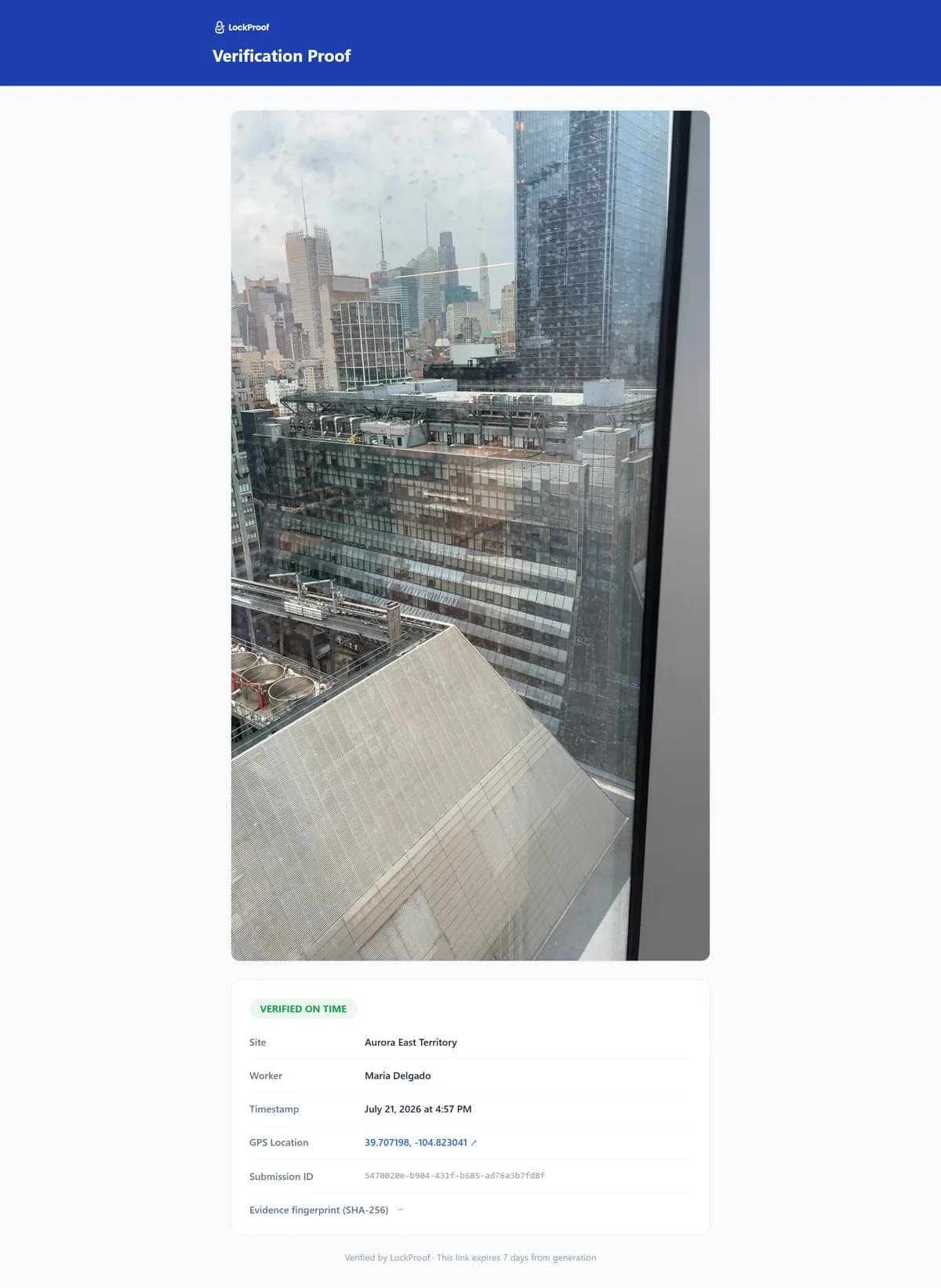
What a contested bill actually turns on
In 2021 a New Jersey roofing contractor and his two companies were sentenced for billing a public sewerage agency $10,210 for equipment rentals that never took place. The equipment was already his, invoiced through a second company prosecutors described as a shell with no assets. He drew five years of probation, restitution, a $75,000 anti-corruption profiteering penalty, and debarment from government contracts (New Jersey Attorney General, May 2021). Now look at how the disputed bill itself ended: the agency settled it for $5,972 against a $10,210 claim. A settlement is a number two parties agree to stop arguing about. It is not a finding about what happened on the job. That is where a contested invoice can land when the paperwork behind it was written by the side sending it, and it lands there whether or not the work was actually done.
So be exact about what a photo would and would not have done here. No photograph prices a rental. And nothing on this page certifies that a job was done properly — that judgment still belongs to a person looking at the work. What a sealed capture adds is narrower: an image taken through a live camera, carrying a time the server set rather than either party to the argument. Whenever that record was made, it cannot be handed an earlier date afterward without breaking the seal. That is a different thing to put in front of a customer than a document your own office typed up.
Your word against theirs, or a record
If your answer to a dispute is a signed work order and a photo somebody texted in, you are answering with paperwork you produced yourself. That may well be enough. It stops being enough the moment the customer treats it as your side of the story. Here is what changes.
| The question | A sealed record | Your paperwork |
|---|---|---|
| Who made the record | The camera and the server did | Your office did |
| Where the picture came from | The live camera, through the link | Whatever was on the phone |
| The time on it | Written by the server on arrival | The phone’s clock |
| Editing the photo afterward | Breaks the SHA-256 seal | Leaves no trace |
| Location attached to it | GPS when the worker shares it | Usually not captured |
| What you hand over | One signed link, good for seven days | A photo and an explanation |
What LockProof leaves alone
LockProof will not dispatch your crews, write your invoices, or keep your books. Those tools are fine. Keep them. What it adds is the piece none of them hold: a record of the finished work captured live at the job and sealed on arrival, rather than written up afterward by the office that is billing for it. You can see the shape of one in the sample verified record. The same loop, put in a cleaner’s vocabulary, sits on the page for commercial cleaning crews.