Vendor accountability software
Hold your vendors to proof, not their word
How it works
Four steps. The vendor needs no app and no account, and the record reaches you without a single follow-up call.
- Schedule the vendor job. The contractor gets a text with a link at the scheduled time. No app to download, no portal account, no password to reset.
- The link opens the camera. It is a live camera only, so the photo has to be taken at your property, never pulled from the vendor’s camera roll after the fact.
- The capture is sealed. The server sets a time the vendor cannot backdate, and each record gets a SHA-256 chain of custody so a later edit shows. When the vendor shares location, GPS is recorded too, and flagged if it lands beyond a set distance from your site.
- The record files itself. Every vendor job lands on your dashboard, searchable by property, contractor, or date, ready the day an invoice, an owner, or a board asks whether it happened.
What each verified vendor job carries
- A live photo of the finished job, captured through the link, never uploaded from a camera roll
- GPS recorded on submission when the vendor shares location, flagged for you if it lands beyond a set distance from your property address
- A server-set timestamp the vendor cannot backdate
- A SHA-256 chain of custody on every record
- Randomized reminder timing, so a photo cannot be staged before the work
- A dashboard that marks each vendor job done, late, or missed
- An Evidence Vault searchable by property, contractor, or date
- A signed proof link you can hand an owner, a board, or an auditor
- No vendor app and no account, in English and Spanish
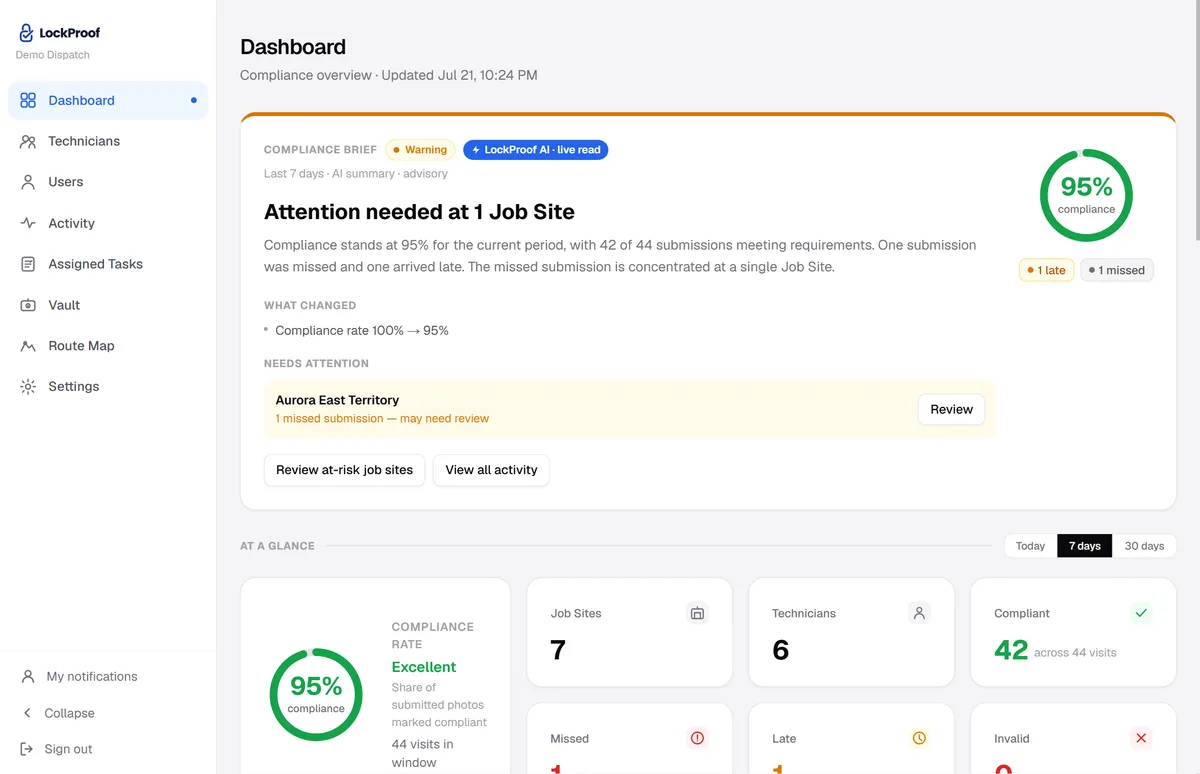
Every vendor visit on one screen
Credentialing tells you a vendor is approved to work. This tells you what they actually did: every visit filed against the vendor and the site, sorted as verified, late, or missed.
Why vendor proof matters now
An approved invoice is not proof the work happened. It is proof someone signed off, and those can be two different things. In 2016 a Detroit Public Schools supply vendor was sentenced to five years in prison and ordered to repay about $2.7 million after billing the district for goods that were never delivered, while school principals signed off on the phony invoices in exchange for roughly $900,000 in kickbacks (U.S. Department of Justice). When the person approving the bill is the weak point, an organization needs a record of the work itself, independent of any signature. A live photo, filed with a sealed time — and the location when the vendor shares it — is that record: on file before an invoice is ever questioned, dispute-ready.
Credentialing vs. proof of the work
Vendor management platforms answer a real question: is this contractor insured, contracted, and cleared to be on site? Worth knowing. It is a different question from whether Tuesday’s billed job actually happened. Here is what each one gives you.
| LockProof | Vendor management software | |
|---|---|---|
| What it verifies | The billed work itself | Credentials, contracts, insurance |
| When it helps | Every job, as it happens | Before the vendor starts |
| Evidence the job happened | Live photo, sealed time, GPS when shared | None |
| When an invoice is questioned | Shows the work was done | Shows the vendor was approved |
| Tamper-evidence | SHA-256 chain of custody | Not applicable |
| Hand it to an owner or board | One signed proof link | A compliance report |
The two fit together: your vendor management system decides who may work at your properties, and LockProof records what they actually did there. If a job flows through a CMMS work order, the work order verification page covers that path; for work your own in-house crews do, see photo proof software for property managers. Want to see one finished record? Look at a sample verified record. And if a vendor invoice is ever disputed, the proof is already on file, dispute-ready.
Common questions
What is vendor accountability software?
Most tools sold under that name manage who your vendors are: certificates of insurance, contracts, credentialing paperwork. LockProof covers the other half of accountability — whether the vendor actually did the work they billed for. Each vendor job comes back as a live photo with a sealed time, and GPS when the vendor shares location, so an invoice arrives with proof of the work attached, not just the vendor’s word that it happened.
Does LockProof replace my vendor management system?
No. Keep whatever you use for credentialing, insurance certificates, and contracts. LockProof adds the piece those systems leave out: independent evidence the billed work happened on site. It is not a compliance or bidding platform. It is the work-proof layer that sits alongside one, tied to each job at each property.
Do vendors need an app or a login?
No. The contractor taps a link in a text and the camera opens. No app, no account, no portal password to reset, and it works in English and Spanish. The link opens a live camera only, so the photo is taken at your property when the job is finished, never chosen from the vendor’s camera roll afterward.
Can a vendor fake or reuse a photo?
The link opens a live camera only and will not accept a camera-roll upload, so an old shot can’t be passed off as today’s job. Reminder timing is randomized, so a photo can’t be staged before the work. Every submission carries a server-set time the vendor cannot backdate and a SHA-256 chain of custody that makes any later edit to the record detectable; when the vendor shares location, GPS is recorded too, and flagged if it lands beyond a set distance from your site.
How much does vendor accountability software cost?
LockProof is priced per site and confirmed on a short call. Essentials starts at $99 a month and Professional at $399 a month; Enterprise is custom. Your exact plan depends on how many sites and vendors you run. Book a demo and we will price it against your own portfolio.