Construction photo documentation software
Jobsite photos that hold up when the bill is questioned
What is construction photo documentation software?
Construction photo documentation software captures and files jobsite photos so you can show what was built, when, and where. LockProof does it as proof: each photo is a live capture with a server-set time and a chain of custody — plus GPS when the worker shares location — filed by job and date so a finished phase holds up when a client, a GC, or a lender asks.
How is this different from a jobsite photo app or photo library?
A photo library organizes pictures: folders, markup, PDF reports. Useful, but a stored photo is still one someone could have taken anywhere, any time, and edited later. LockProof captures the photo as evidence instead, so the record is tied to a place and a sealed time and a change after the fact shows.
Do crews need an app or a login?
No. A foreman or a sub taps a link in a text, and the camera opens. There is nothing to load onto anyone’s phone and nothing to remember, and the worker screens are in English and Spanish. The link opens a live camera, so the shot is taken at the jobsite, not chosen from the camera roll later.
Can a photo or its timestamp be faked?
The link opens a live camera only, so an old picture can’t be attached from the gallery, and reminder timing is randomized so a phase can’t be staged early. Each submission carries a server-set time the crew cannot change and a SHA-256 chain of custody, so any later edit to the record is detectable.
What is the best construction photo documentation software?
It depends on what the photos are for. If you want jobsite pictures captured fast and filed by project — pinned to plans, rolled into daily reports, or walked in 360 — several tools do that well, and they are ranked further down this page with what each one is actually for. If you need the same shot verifiable enough to hand a GC, an owner, or a lender when a draw is questioned, that is a different job, and it is the one LockProof does.
What makes a record hold up when a draw is questioned?
It depends who has to believe it, and stamping the image is a strong habit that settles most ordinary questions. A record carries further with the party paying the bill when two things are true of it: the time on it was written by something the submitter does not operate, and a later change to the file is detectable. LockProof does both — the server writes the time when the submission arrives, and the image and that time are sealed under one SHA-256 fingerprint, with the coordinates when the worker shares location.
Can I use a documentation tool and LockProof together?
Yes, and many crews should. Keep the app your team already uses for daily photos, plan pins, and reports. Add LockProof on the phases that get billed and questioned — a pour, a rough-in, a covered inspection — so those specific records carry proof a folder of pictures cannot. It is a verification layer on top, not a replacement for your photo app.
How much does construction photo documentation software cost?
Pricing runs per site, set on a short call rather than off a public sticker. Essentials starts at $99 a month and Professional at $399 a month, and the plan tracks your crew size and how many jobsites you run. Book a demo and we price it against your own jobs.
How it works
Four steps, and nothing loaded onto the crew’s phone.
- Assign the phase. Schedule the pour, the rough-in, the punch item, and the crew gets a text with a link.
- The link opens the camera on site. Live capture only, so the photo comes from the jobsite, not from an old shot in the gallery.
- The record seals. It carries a time the server sets rather than the phone and a SHA-256 seal that breaks if the image is touched afterward, plus the GPS reading when the worker shares location.
- Attach it to the draw. Each documented phase shows on the dashboard and can go out as a single signed link, clipped to a pay app or sent the day a lender asks to see progress.
What each documented phase carries
- The finished phase as a live photo, taken through the link, never uploaded from a gallery
- A GPS reading recorded on submission when the worker shares location, flagged for you if it lands beyond a set distance from the jobsite
- A timestamp the server writes, not the crew
- A SHA-256 chain of custody, so a photo touched after the pour stops matching
- Each phase on the dashboard: done, late, or missed
- An Evidence Vault searchable by job, crew, or date
- A 7-day signed link for a GC, an owner, or a lender
- No app to load, no login, worker screens in English and Spanish
What a documented phase files as
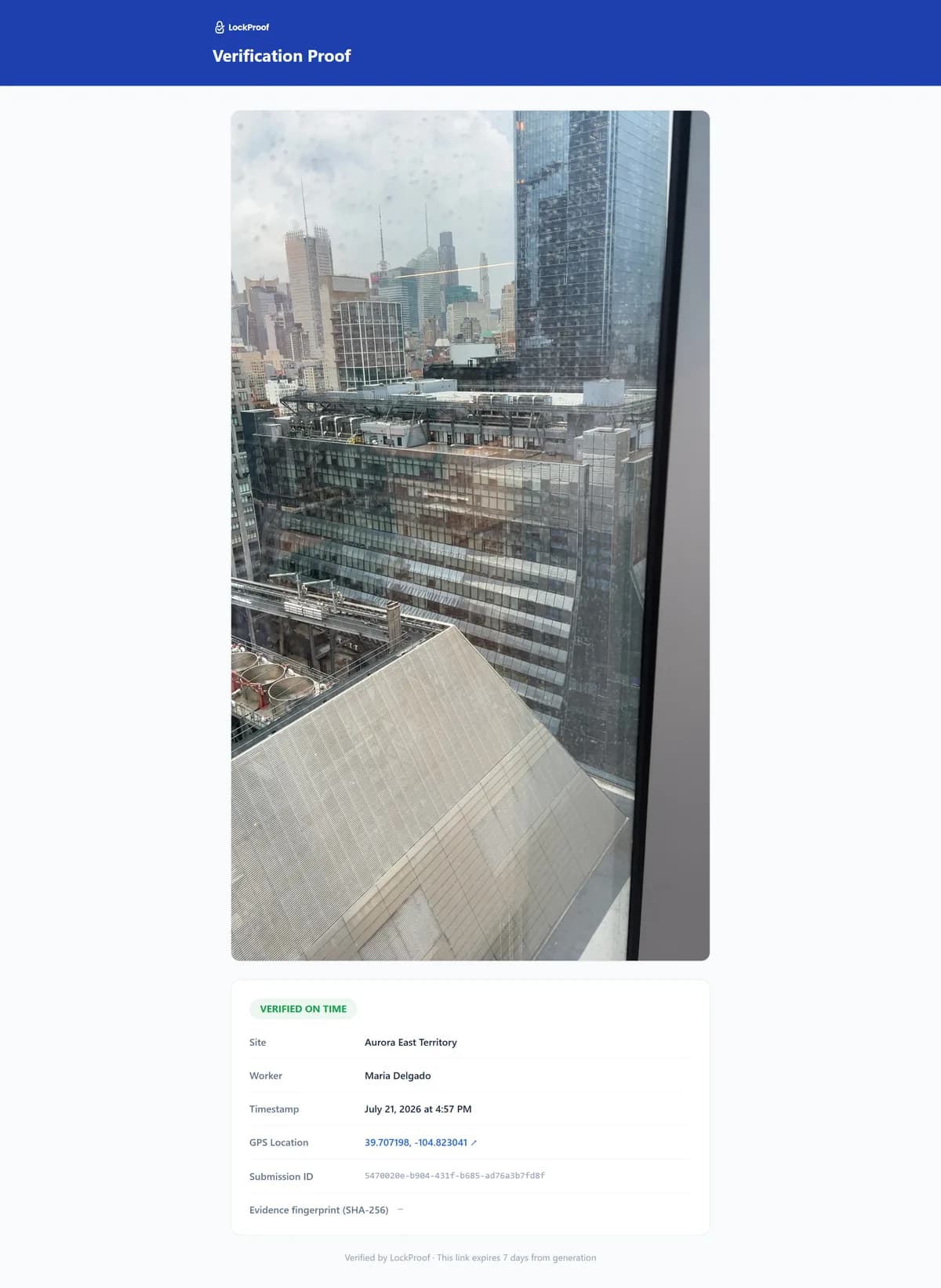
A billed phase comes back looking like this — the work as a live photo, a time written by the server rather than the crew, and a SHA-256 chain of custody, plus GPS when the foreman shares location. It is the thing you attach to a draw instead of a folder of pictures.
Why a dated phase record matters
On a progress job, the money moves before anyone re-checks the work. A contractor in Delaware County, New York was paid more than $360,000 to put in a septic system, underground electric, foundations, and small structures. He billed for the work and was paid in full. A property inspector later found much of it had never been done, and the owner could not reach him. He pleaded guilty to grand larceny and was sentenced to state prison (local court reporting, June 2026). Most jobs are honest, and this one was extreme. But the shape is ordinary: a phase gets billed as complete, the draw clears, and the gap surfaces months later. A dated photo of each phase — GPS-tagged when the worker shares location — filed as the work was billed, puts the missing work in plain view at the draw instead of after full payment. That is the difference between a folder of pictures and a record you can stand behind — on file before anyone questions the pay app, dispute-ready.
A photo library vs. a proof record
A jobsite photo app keeps your pictures tidy. That is worth having. It is not the same as a record that holds when a draw is challenged. Here is what each one actually carries.
| What the record carries | A proof record | A jobsite photo app |
|---|---|---|
| What it does with a photo | Verifies how and when it was taken | Stores and organizes it |
| How the photo is captured | Live camera only, on site | Uploaded, often from the gallery |
| Time you can rely on | Server-set, out of the crew’s hands | The phone’s clock, editable |
| A later edit is detectable | SHA-256 chain of custody | Rests on the file’s own metadata |
| Tied to the jobsite | GPS when shared | Sometimes, if GPS is on |
| Ready to hand to a lender | One signed, tamper-evident link | A folder of images |
Where a stamped photo and a sealed record part ways
A stamped photo and a sealed record look identical on a phone screen. They come apart at one specific moment: when someone who is not on your side has to accept the time. In a sealed record that input sits somewhere the sender does not operate.
What makes that concrete rather than theoretical is where the seal lives. It is not drawn onto the picture: it is a SHA-256 fingerprint computed over the image bytes and the server-set time — plus the coordinates when the worker shares location — stored alongside the record. Change any one of those inputs afterwards and the fingerprint stops matching, which is what makes a later edit detectable rather than merely discouraged.
Jobsite photo tools, and where each one fits
Most crews already run something for daily photos, and the honest answer is that most of those tools are good at the job they are built for. Here is the field as it stands, ranked by what each one is actually for rather than by which is “best” — and where a verification layer earns a place alongside the app you already have.
Vendor details and prices on this page were verified on the dates given with each entry below, most as of July 2026; the last-updated date at the top reflects later edits to our own commentary and structure, not a re-check of vendor pricing.
1. LockProof — best for proof of a finished phase you can hand a GC or a lender
Not a photo library, the verification layer described above. A foreman taps a text link — no app, no login — and the link opens the camera. Gallery uploads are blocked, so an old or borrowed shot cannot be submitted. Each photo comes back with a server-set time and a SHA-256 chain of custody — plus GPS when the worker shares location — filed as a dispute-ready record you can share as one signed link the day a pay application is challenged. From $99/month (Essentials); Professional from $399/month, as of July 2026.
2. CompanyCam — best for fast capture that lands auto-organized by project
A jobsite photo app that captures photos and auto-organizes them by project, with team collaboration, AI photo annotations, and 60+ integrations. Its homepage describes the product as photo documentation and AI tools that keep work moving from the field to the office (as of September 2026). Core at $63/month (1 user, then $29/additional user), Crew at $129/month, Scale at $199/month, and a custom Enterprise plan, as of July 2026. See companycam.com.
3. TaskTag — best for keeping jobsite photos and tasks tagged inside team messaging
A construction messaging app that tags photos, files, and tasks by project, so a jobsite conversation stays organized and searchable instead of scattered across texts. It describes turning jobsite updates into accountable tasks with photo proof for billing, framing the flow as approval through to payment (as of September 2026). A free tier (up to 3 projects), a Team plan at $16 per member/month billed yearly with crew members free, and a custom Enterprise plan, as of July 2026. See tasktag.com.
4. Timemark — best for map-based photo views with timestamped, GPS-stamped exports
A cloud photo platform that stamps every photo with a timestamp and GPS, organizes them by project, and offers map-based photo views, offline capture, and many export formats. Its published authenticity claim is a verified timestamp and GPS location backed by a unique photo code; it also operates a public Photo Verification Center (verify.timemark.com) where a photo code can be checked. Plus at $5/user/month and Business at $7/user/month, with Enterprise listed as coming soon, as of August 4, 2026. See timemark.com.
5. Fieldwire — best for tasks and punch lists tied to the plan, working offline
Real-time jobsite management from Hilti: task tracking, punch lists, inspections, and plan viewing, with offline access on site. Its homepage says capturing as-built project information creates an indisputable record of work performed, and lists verifying with photos and videos among the field tasks it covers (as of September 2026). Basic at $0/user, Pro at $39/user, Business at $64/user, and Business Plus at $89/user (per user/month, billed annually), as of July 2026. See fieldwire.com.
6. OpenSpace — best for hands-free 360-degree site walks mapped to the floor plan
A visual-intelligence platform that captures 360-degree site imagery from a phone or a helmet-mounted camera and maps it to floor plans, so you can walk a jobsite remotely and track progress over time. It calls the result a visual record, and describes teams using it to verify work, compare plans and models, and track progress (as of September 2026). Pricing was not published where we looked — OpenSpace bases it on annual construction volume across Core and Enterprise tiers, as of July 2026. See openspace.ai.
7. Buildertrend — best for running the whole residential build, with photos as one part of the record
A broad residential construction platform spanning scheduling, budgets, change orders, client communication, and daily logs, with photo documentation filed inside the project record. It presents itself as construction project management software for home builders, remodelers and contractors, with photos as one part of a much broader project record (as of September 2026). Pricing was not published where we looked — Buildertrend uses a custom quote (it advertises 10% off annual plans and unlimited users), as of July 2026. See buildertrend.com.
Several of the tools above stamp a time and a location onto the shot, and Timemark publishes an authenticity claim backed by a unique photo code and operates a public Photo Verification Center where a photo code can be checked (as of August 5, 2026; its pricing re-verified as of August 4, 2026). None of that makes a documentation app the wrong tool. It makes it a different tool — and if your photos need to survive a billing dispute rather than only organize a project, that is the line where the two belong side by side.
Not a full construction suite
LockProof is not a project-management platform, and it does not run your schedule, RFIs, or budgets. Keep the tools that do. LockProof adds the one layer a photo folder cannot: proof each phase was actually built, captured at the work and sealed. See a finished example in a sample verified record, or how it fits field service and trade crews.